Setting up a gumstix SD Card

My notes, based on http://gumstix.org/create-a-bootable-microsd-card.html

fdisk -l /dev/sdd

Disk /dev/sdd: 32.2 GB, 32191283200 bytes
255 heads, 63 sectors/track, 3913 cylinders
Units = cylinders of 16065 * 512 = 8225280 bytes
Sector size (logical/physical): 512 bytes / 512 bytes
I/O size (minimum/optimal): 512 bytes / 512 bytes
Disk identifier: 0x00000000

   Device Boot      Start         End      Blocks   Id  System
/dev/sdd1               1        3914    31432704    c  W95 FAT32 (LBA)

Calculate number of cylinders required:

root@ubuntu:~# bc -l
bc 1.06.95
Copyright 1991-1994, 1997, 1998, 2000, 2004, 2006 Free Software Foundation, Inc.
This is free software with ABSOLUTELY NO WARRANTY.
For details type `warranty'. 
32191283200/255/63/512
3913.70059134765017117958
quit

Wipe the SD card:

root@ubuntu:~# dd if=/dev/zero of=/dev/sdd bs=1024 count=1024
1024+0 records in
1024+0 records out
1048576 bytes (1.0 MB) copied, 2.84156 s, 369 kB/s

Parition the disk:

root@ubuntu:~# sfdisk --force -D -uS -H 255 -S 63 -C 3913 /dev/sdd
Checking that no-one is using this disk right now ...
OK

Disk /dev/sdd: 3913 cylinders, 255 heads, 63 sectors/track

sfdisk: ERROR: sector 0 does not have an MSDOS signature
 /dev/sdd: unrecognised partition table type
Old situation:
No partitions found
Input in the following format; absent fields get a default value.
<start> <size> <type [E,S,L,X,hex]> <bootable [-,*]> <c,h,s> <c,h,s>
Usually you only need to specify <start> and <size> (and perhaps <type>).

/dev/sdd1 :128,130944,0x0C,*
/dev/sdd1   *       128    131071     130944   c  W95 FAT32 (LBA)
/dev/sdd2 :131072,,,-
/dev/sdd2        131072  62873599   62742528  83  Linux
/dev/sdd3 :
/dev/sdd3             1       127        127  83  Linux
/dev/sdd4 :
/dev/sdd4             0         -          0   0  Empty
New situation:
Units = sectors of 512 bytes, counting from 0

   Device Boot    Start       End   #sectors  Id  System
/dev/sdd1   *       128    131071     130944   c  W95 FAT32 (LBA)
/dev/sdd2        131072  62873599   62742528  83  Linux
/dev/sdd3             1       127        127  83  Linux
/dev/sdd4             0         -          0   0  Empty
Warning: partition 1 does not end at a cylinder boundary
Do you want to write this to disk? [ynq] y
Successfully wrote the new partition table

Re-reading the partition table ...

If you created or changed a DOS partition, /dev/foo7, say, then use dd(1)
to zero the first 512 bytes:  dd if=/dev/zero of=/dev/foo7 bs=512 count=1
(See fdisk(8).)

Format the paritions:

root@ubuntu:~# mkfs.vfat -F 32 /dev/sdd1 -n boot
mkfs.vfat 3.0.7 (24 Dec 2009)
root@ubuntu:~# mke2fs -j -L rootfs /dev/sdd2
mke2fs 1.41.11 (14-Mar-2010)
Filesystem label=rootfs
OS type: Linux
Block size=4096 (log=2)
Fragment size=4096 (log=2)
Stride=0 blocks, Stripe width=0 blocks
1962240 inodes, 7842816 blocks
392140 blocks (5.00%) reserved for the super user
First data block=0
Maximum filesystem blocks=4294967296
240 block groups
32768 blocks per group, 32768 fragments per group
8176 inodes per group
Superblock backups stored on blocks: 
	32768, 98304, 163840, 229376, 294912, 819200, 884736, 1605632, 2654208, 
	4096000

Writing inode tables: done                            
Creating journal (32768 blocks): done
Writing superblocks and filesystem accounting information: done

This filesystem will be automatically checked every 21 mounts or
180 days, whichever comes first.  Use tune2fs -c or -i to override.

Mount the partitions and copy the current root to them:

root@ubuntu:~# sudo mkdir /media/{boot,rootfs}
root@ubuntu:~# sudo mount -t vfat /dev/sdd1 /media/boot
root@ubuntu:~# sudo mount -t ext3 /dev/sdd2 /media/rootfs
root@ubuntu:~# cd /media/boot/
root@ubuntu:/media/boot# ls
root@ubuntu:/media/boot# cd ~
root@ubuntu:~# wget http://cumulus.gumstix.org/images/angstrom/developer/current/MLO
--2011-11-21 11:31:12--  http://cumulus.gumstix.org/images/angstrom/developer/current/MLO
Resolving cumulus.gumstix.org... 74.3.164.55
Connecting to cumulus.gumstix.org|74.3.164.55|:80... connected.
HTTP request sent, awaiting response... 200 OK
Length: 24304 (24K)
Saving to: `MLO'

100% 24,304      49.8K/s   in 0.5s    

2011-11-21 11:31:13 (49.8 KB/s) - `MLO' saved [24304/24304]

root@ubuntu:~# mv MLO /media/boot
root@ubuntu:~# wget http://cumulus.gumstix.org/images/angstrom/developer/current/u-boot.bin
--2011-11-21 11:31:48--  http://cumulus.gumstix.org/images/angstrom/developer/current/u-boot.bin
Resolving cumulus.gumstix.org... 74.3.164.55
Connecting to cumulus.gumstix.org|74.3.164.55|:80... connected.
HTTP request sent, awaiting response... 200 OK
Length: 269120 (263K) [application/octet-stream]
Saving to: `u-boot.bin'

100% 269,120      199K/s   in 1.3s    

2011-11-21 11:31:49 (199 KB/s) - `u-boot.bin' saved [269120/269120]

root@ubuntu:~# mv u-boot.bin /media/boot
root@ubuntu:~# wget http://cumulus.gumstix.org/images/angstrom/developer/current/uImage
--2011-11-21 11:32:08--  http://cumulus.gumstix.org/images/angstrom/developer/current/uImage
Resolving cumulus.gumstix.org... 74.3.164.55
Connecting to cumulus.gumstix.org|74.3.164.55|:80... connected.
HTTP request sent, awaiting response... 200 OK
Length: 3091308 (2.9M) 
Saving to: `uImage'

100% 3,091,308    205K/s   in 15s     

2011-11-21 11:32:23 (196 KB/s) - `uImage' saved [3091308/3091308]

root@ubuntu:~# mv uImage /media/boot
root@ubuntu:~# wget http://cumulus.gumstix.org/images/angstrom/developer/current/omap3-desktop-image-overo.tar.bz2
--2011-11-21 11:34:06--  http://cumulus.gumstix.org/images/angstrom/developer/current/omap3-desktop-image-overo.tar.bz2
Resolving cumulus.gumstix.org... 74.3.164.55
Connecting to cumulus.gumstix.org|74.3.164.55|:80... connected.
HTTP request sent, awaiting response... 200 OK
Length: 234752536 (224M) [application/x-bzip2]
Saving to: `omap3-desktop-image-overo.tar.bz2'

100% 234,752,536  396K/s   in 13m 58s 

2011-11-21 11:48:04 (274 KB/s) - `omap3-desktop-image-overo.tar.bz2' saved [234752536/234752536]

root@ubuntu:~#  tar xaf omap3-desktop-image-overo.tar.bz2 -C /media/rootfs
root@ubuntu:~# ls /media/rootfs/
bin  boot  dev  etc  home  lib  linuxrc  lost+found  media  mnt  proc  sbin  sys  tmp  usr  var
root@ubuntu:~# sync
root@ubuntu:~# umount /media/boot
root@ubuntu:~# umount /media/rootfs

Network config

If your using a board with a network interface and want to use this at first boot:

edit /etc/network/interfaces

Add the following for a static config:

auto eth0
iface eth0 inet static
address 192.168.0.7
netmask 255.255.255.0
gateway 192.168.0.254

or uncomment the following for a dynamic config:

auto eth0
iface eth0 inet dhcp

Fin
VirtualBox MacOS add Host-only network to Ubuntu VM

VirtualBox -> Preferences -> Network -> “+”. Should add a network interface called vboxnet0.

UbuntuVM -> Settings -> Network -> “Adapter N” -> Attached to (change to Host-only). Select vboxnet0.

In Ubuntu VM:

sudo ifconfig ethN 192.168.20.1

In MacOS:

sudo ifconfig vboxnet0 192.168.20.2

Deshredding tool

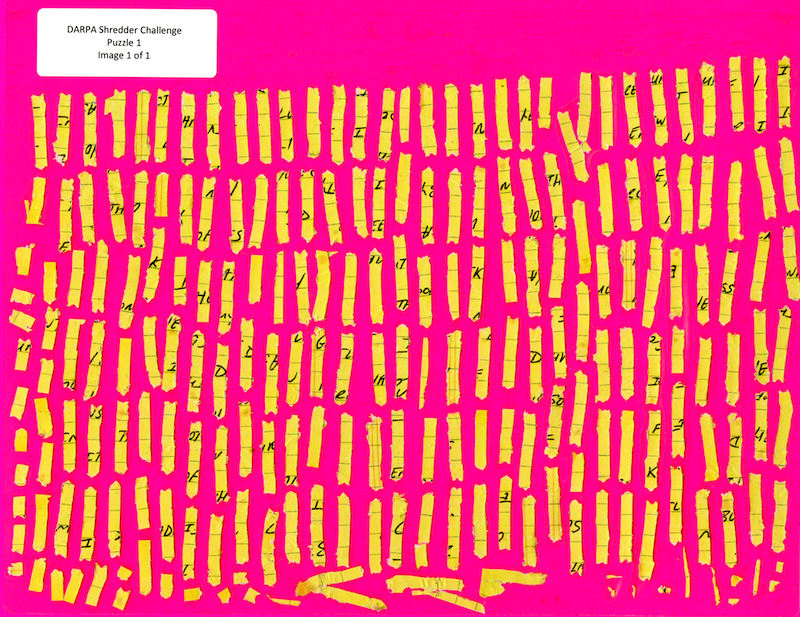
I’ve been playing with the DAPRA deshredding challenge. The challenge is to reconstruct the original text of a series of shredded pages (like the one shown above). That image is the easiest challenge, the fragments get progressively smaller, and the problem gets progressively harder. Computationally it seems rather tough! I wanted to post my work in progress and some details of the issues you encountered.

First of all, my current code base is here: https://github.com/new299/DS. There are a number of tools, all written and C++ and I’m afraid very badly and quickly hacked together.

ds_isolate: This tool isolates individual fragments from the image (image segmentation). It also tries to get all fragments in the same orientation. You can see an example output in the directory puzzle1
ds_orientate: This tool tries to get the fragments facing the right way. I.e. all “pointing” up.
ds_clean: This tool attempts create binary versions of the fragments, dividing the individual fragments into foreground/background pixels. It also create “edge_walk” files. These are walks around the edge of the fragment which contains 0 for a background pixel and 1 for a foreground pixel.
ds_align: This tool tries to align all the edge_walks. This is hard!
ds_qc: This is a SDL based tool for moving around and plaything with the fragments. It can also perform some alignment using the edge_walk files on the fly.

I built all this on a mac. If you want to do the same, you’ll need to install libtiff and SDL.

So, here’s my method in a little more detail:

ds_isolate – image segmentation

The segmentation progress is pretty straight forward, they’ve given us relatively nice clean images to play with. To segment I pick start pixels 10 pixel in from the edges of all corners. I then perform a random walk, only moving to pixels with a near RGB value. The distance function is simple euclidean distance.

I choose a limit of “10” because that seemed to work, pretty good enough. During the random walk I collect all the pixel I encounter and stick them in a vector. I let the random walks continue for 50,000,000 (that’s probably WAY more than required). I then take this set of pixels and expand it a little, adding all pixels within a difference of 10 in R,G,B space (quick and dirty).

I then remove (set to 0) all the pixels which have a value in that dataset. Once this is done I then extract all connected pixels that are non-0. Any fragments that are too small (say 20pixels), I throw out.

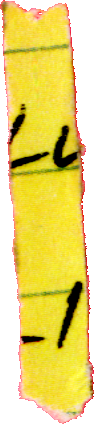
I think the segmentation there is pretty clean. On the right you can see a dark artifact, those artifacts are not always present, but are common enough to be annoying.

Now the images are segmented the individual fragments are stored in a directory as follows: OUTPUTDIR/fragment_N/original.tif

ds_orientate – Get the fragments in the correct orientation

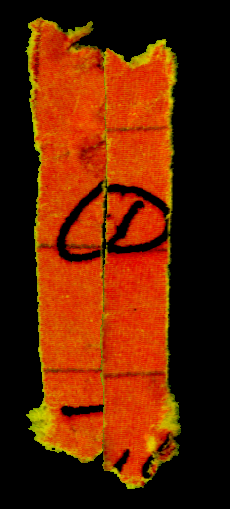
You can see that the fragment above isn’t pointing straight up. I decided that it would make down stream processing much easier if all the fragments were in the same orientation. This is what ds_orientate does. The tool rotates the images, in increments of 0.01 radians. After each rotation it checks the width of the image. After all rotates we select the rotation which resulted in the minimal width. Because all the fragments are /kind of/ rectangular this should get them all “standing up”. However they could still be rotated by 180 degrees. So I then check if the “pointy” end is at the bottom, if it isn’t I rotate the image by 180 degrees.

Here’s the rotated image:

Again, this works pretty well. It breaks with some fragments, particularly those with deformed ends or those that are completely bent.

ds_clean – Cleaning fragments and extracting edge walks

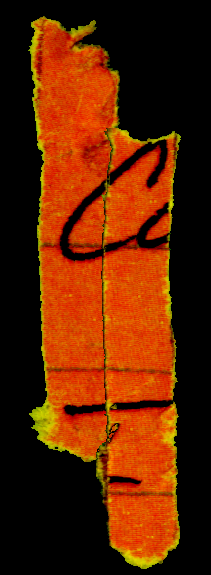
This is where things start to get tricky. This tool attempts to divide the fragment in to foreground and background components. It takes the fragments and converts them to greyscale images, and simple thresholding function is them applied. I also have a function that specifically tries to repair linear features (the lines on the paper). However as you can see here, it hasn’t done a great job with the lines.

After thresholding the image, ds_clean performs edge walks along the edges of the fragment. It identifies the top left/right and bottom left/right corners. It then performs a pixel walk along the edge and produces a string e.g.

00000000000000000000000000000000000000000000000000111111111100000000000000000000000000000000000111111100000000000000000000000

Where 1s represent where the tool found a foreground pixel, 0s a background pixel. It writes those strings to files in the directory structure called “edge_walk”.

ds_align – Attempt to align all the fragment edges

ds_align takes all the edge_walk files and attempts to align the left and right sides against each other. It takes every overlap of each pair of strings and performs a weighted edit distance between them. It’s weighted so that foreground pixels count for more than background pixels. This results is a huge matrix of “what aligned best” for each fragment.

A work in progress

So, that’s where I got to so far. The alignment process works in /some/ cases, but isn’t great. I think perhaps I need to take fragment contours into account. However, I’m not sure how much more time I can devote to this project. Perhaps if someone out there wants to team up?? 🙂

A case that causes problems

This is the top hit for one of the fragments. It aligns really well because almost the whole edge is touching, and the black parts match on the top character!

This is the correct alignment, but my code has it as the second hit. Thing like this will be a problem and are caused by the fact that the shredder doesn’t keep all the fragments in alignment (which is great from the shredder makers point of view of course). But because less of the edge is touching, it gets scored lower. Even though a human observer and see that this is the correct match.

In this case I could possibly solve the problem by up weighting the foreground pixel scores. But the general case maybe more difficult. And I’m wondering if more about the shape of the character, and the direction of the lines near the edge of the fragment needs to be taken in to account.

Rotate image by 180 degrees (libtiff code)

Fastish inplace rotation of an image by 180 degrees:

  void rotate180() {

    size_t h;
    if((m_height%2) == 1) {
      h = (m_height/2)-1;
      size_t ymid = ((m_height-1)/2);

      for(size_t x=0;x<(m_width/2);x++) {
        swap_pixel(x,ymid,(m_width-x-1),ymid);
      }

    } else h = (m_height/2)-1;
    for(size_t x=0;x<m_width;x++) {
      for(size_t y=0;y<=h;y++) {
        swap_pixel(x,y,m_width-x-1,m_height-y-1);
      }
    }
  }

You need to provide image get and set, and swap_pixel. Complete example below:

#include "tiffio.h"
#include <iostream>
#include <math.h>
#include <vector>
#include <map>
#include <sys/stat.h>
#include <sys/types.h>
#include <sstream>
#include <stdexcept>

#define TIFFSetR(pixel, x) ((unsigned char *)pixel)[0] = x
#define TIFFSetG(pixel, x) ((unsigned char *)pixel)[1] = x
#define TIFFSetB(pixel, x) ((unsigned char *)pixel)[2] = x
#define TIFFSetA(pixel, x) ((unsigned char *)pixel)[3] = x


class BadConversion : public std::runtime_error {
public:
 BadConversion(const std::string& s)
      : std::runtime_error(s) {}
};

template<class _type>
inline std::string stringify(_type x)
{
  std::ostringstream o;
  if (!(o << std::fixed << x))
    throw BadConversion("stringify()");
  return o.str();
}

using namespace std;

class Image {

public:

  Image() {
  }

  enum fragment_type { frag_type_arrow, frag_type_rectange } ;

  void load_tiff(string input_filename) {

    m_image_data.clear();

    TIFF* tif = TIFFOpen(input_filename.c_str(), "r");
    if (tif) {
      uint32 w, h;
      size_t npixels;
      uint32* raster;

      TIFFGetField(tif, TIFFTAG_IMAGEWIDTH, &w);
      TIFFGetField(tif, TIFFTAG_IMAGELENGTH, &h);
      npixels = w * h;
      m_width = w;
      m_height = h;

      raster = (uint32*) _TIFFmalloc(npixels * sizeof (uint32));
      if (raster != NULL) {
	if (TIFFReadRGBAImageOriented(tif, w, h, raster,ORIENTATION_TOPLEFT, 0)) {
	  for(size_t n=0;n<npixels;n++) m_image_data.push_back(raster[n]);
	}
	_TIFFfree(raster);
      }
      TIFFClose(tif);
    }
  }

  void save_tiff_rgb(string output_filename) {
    TIFF *output_image;

    // Open the TIFF file
    if((output_image = TIFFOpen(output_filename.c_str(), "w")) == NULL){
      cerr << "Unable to write tif file: " << output_filename << endl;
    }

    // We need to set some values for basic tags before we can add any data
    TIFFSetField(output_image, TIFFTAG_IMAGEWIDTH, m_width);
    TIFFSetField(output_image, TIFFTAG_IMAGELENGTH, m_height);
    TIFFSetField(output_image, TIFFTAG_BITSPERSAMPLE, 8);
    TIFFSetField(output_image, TIFFTAG_SAMPLESPERPIXEL, 4);
    TIFFSetField(output_image, TIFFTAG_PLANARCONFIG, PLANARCONFIG_CONTIG);

    TIFFSetField(output_image, TIFFTAG_COMPRESSION, COMPRESSION_DEFLATE);
    TIFFSetField(output_image, TIFFTAG_PHOTOMETRIC, PHOTOMETRIC_RGB);

    // Write the information to the file
    TIFFWriteEncodedStrip(output_image, 0, &m_image_data[0], m_width*m_height * 4);

    // Close the file
    TIFFClose(output_image);
  }

  bool is_on_image(size_t x,size_t y) {
    if((x < m_width) && (y < m_height)) return true;
    return false;
  }

  uint32_t get(size_t x,size_t y) {
    return m_image_data[(y*m_width)+x];
  }

  void set(size_t x,size_t y,uint32_t value) {
    m_image_data[(y*m_width)+x] = value;
  }

  void swap_pixel(size_t x1,size_t y1,
                  size_t x2,size_t y2) {

    uint32_t t = get(x1,y1);
    set(x1,y1,get(x2,y2));
    set(x2,y2,t);
  }

  // Inplace 180 degree rotation.
  void rotate180() {

    size_t h;
    if((m_height%2) == 1) {
      h = (m_height/2)-1;
      size_t ymid = ((m_height-1)/2);

      for(size_t x=0;x<(m_width/2);x++) {
        swap_pixel(x,ymid,(m_width-x-1),ymid);
      }

    } else h = (m_height/2)-1;
    for(size_t x=0;x<m_width;x++) {
      for(size_t y=0;y<=h;y++) {
        swap_pixel(x,y,m_width-x-1,m_height-y-1);
      }
    }
  }

  vector<uint32_t> m_image_data;
  size_t m_width;
  size_t m_height;
};

int main(int argc, char* argv[]) {

  Image i;
  i.load_tiff(argv[1]);
  i.rotate180();
  i.save_tiff_rgb(string(argv[2]));
}