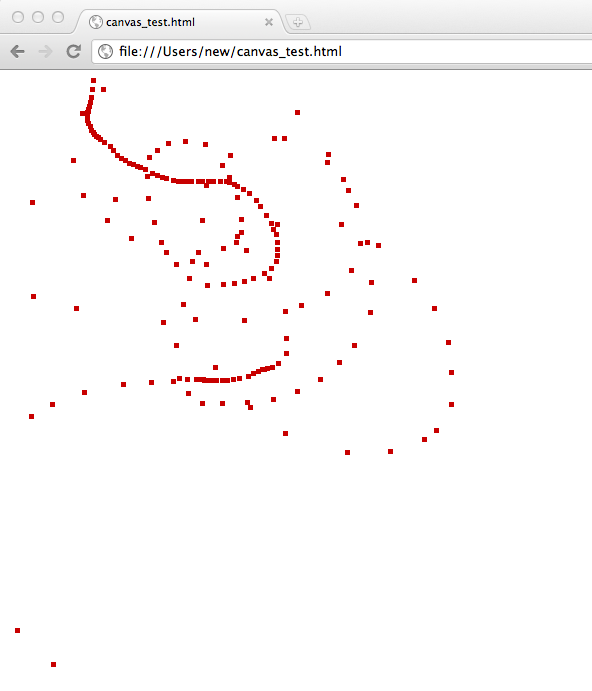
HTML Canvas simple example

<html>
<head>

<script type="text/javascript">

  function draw_rect(x,y) {
    var canvas = document.getElementById("m_canvas");
    if(canvas.getContext) {
      var ctx = canvas.getContext("2d");
      ctx.fillStyle = "rgb(200,0,0)";
      ctx.fillRect(x,y,5,5);
    }
  }

  function onMouseMove(evt) {
    draw_rect(evt.pageX,evt.pageY);
  }

  window.onmousemove = onMouseMove;

</script>


</head>

<canvas id="m_canvas" width="800" height="600">You need a better web browser.</canvas>

</body> 
</html> 

Gumstix serial device emulation

Once you have the kernel built for peripheral mode, getting the gumstix to emulate a serial port is pretty straight forward, just load the g_serial module. This will create a device called /dev/ttyGS0.

modprobe g_serial
cat /dev/random > /dev/ttyGS0

I could get about 3.5 Kilobytes a second over the link.

You can also use g_multi to get serial and mass storage at the same time:

modprobe g_multi file=/file_store_data

Deploying a Rails app (into a subdirectory)

Some notes on deploying my rails application in to a subdirectory. I’m using rvm to manage Rails versions and this was all on Debian Lenny.

1. Install Rails (see here for some pointers).

2. Install Passenger

gem install passenger
apt-get install apache2-prefork-dev
apt-get install libapr1-dev
apt-get install libaprutil1-dev
passenger-install-apache2-module        

Follow the instructions passenger gives you.

3. Edit your apache config

3.1 Create a symlink to your app’s public directory inside your current website root:

(in this example my app is call nihongo)

ln -s /PATH/TO/WEBAPP/nihongo/public /PATH/TO/YOUR/DOCROOT/nihongo

3.1 Edit your apache config for this root to contain a pointer to this app:

RackBaseURI /nihongo
<Directory /PATH/TO/YOUR/DOCROOT/nihongo>
Options -MultiViews
</Directory>

4. Checkout your app…

Possibly use rake db:setup to setup the database. Use “bundle install” to install required bundle files.

Use…

rake assets:precompile

to “compile” assets, or you may get an error such as:

Completed 500 Internal Server Error in 518ms

ActionView::Template::Error (application.css isn't precompiled):
    2: <html>
    3: <head>
    4:   <title>Nihongo</title>
    5:   <%= stylesheet_link_tag    "application" %>
    6:   <%= javascript_include_tag "application" %>
    7:   <%= csrf_meta_tags %>
    8: </head>
  app/views/layouts/application.html.erb:5:in `_app_views_layouts_application_html_erb___2940450108335557336_39013520'
  app/controllers/words_controller.rb:8:in `index'

I don’t quite understand how Rails detects the app is running in production yet. But it does so automatically somehow…

Ruby on the Rails Search Functionality 2nd attempt

My first attempt is here. However that lacked a search box. It was neat in that you could reference the search directly as http://blah/blah/searchstring. However that’s not really what we want, as we want to use search forms and such….

So attempt 2.

First add routes for 2 net methods to routes.rb:

  resources :words do
    collection do
      get 'dosearch'
      get 'search'
    end
  end

I then added 2 new methods to the appropriate controller:

  def search
    @words = Word.where("word = ?",params[:id]) #all #find(params[:id])

    respond_to do |format|
      format.html # search.html.erb
      format.json { render json: @words }
    end
  end

  def dosearch
    @word = ""
    respond_to do |format|
      format.html
      format.json { render json: word }
    end
  end

The first method is as before, and performs the search. The second method really just returns the search html. Perhaps I shouldn’t be using a method for this at all? Just some static html?

Then I added a dosearch.html.erb which will render the search form:

<h1>Search for word</h1>

<%= render 'searchform' %>

<%= link_to 'Back', words_path %>

And a _searchform.html.erb which /actually/ renders the form:

%= form_tag("/words/search", :method => "get") do %>
  <%= label_tag(:q, "Search for:") %>
  <%= text_field_tag(:id) %>
  <%= submit_tag("Search") %>
<% end %>

Next I added a search.html.erb for the search results:

<h1>Search Results</h1>

<table>
  <tr>
    <th>Word</th>
    <th>Definition</th>
    <th>Tags</th>
    <th></th>
    <th></th>
    <th></th>
  </tr>

<% @words.each do |word| %>
  <tr>
    <td><%= word.word %></td>
    <td><%= word.tags %></td>
    <td><%= word.definition %></td>
    <td><%= link_to 'Show', word %></td>
    <td><%= link_to 'Edit', edit_word_path(word) %></td>
    <td><%= link_to 'Destroy', word, confirm: 'Are you sure?', method: :delete %></td>
  </tr>
<% end %>
</table>

<br />

<%= link_to 'New Word', new_word_path %>

<% if session[:user_id] %>
<%= button_to 'Logout', logout_path, method: :delete %>
<% end %>
</div>
<div id="main" >
<%= yield %>

Which is pretty much a standard index.html.erb to return a list.

That is all.