Creating LeafletJS tile sets in golang
esp8266_slip

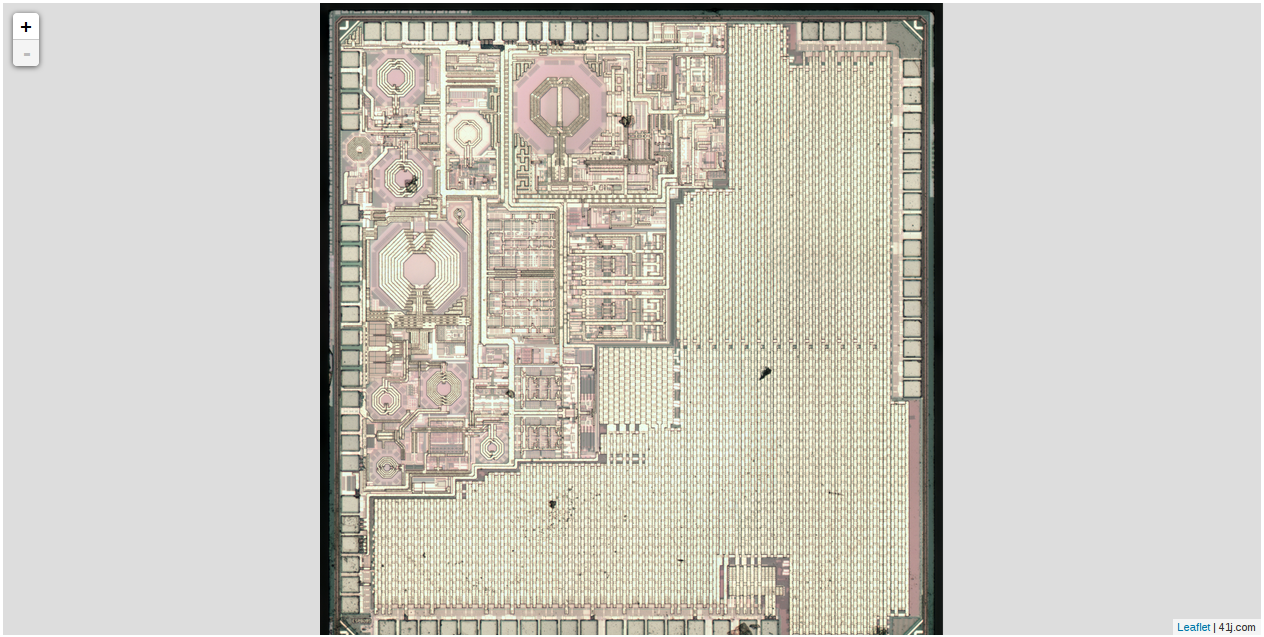
I wanted to create some slippy map style imageviewers using LeafletJS from large flat images files. In order to do this you need to break the image down into tiles of 256×256 pixels and various zoom levels. There are plenty of tools to do this, but none that looked like they quite fit my application. In anycase I figured it would be an interesting golang learning exercise. The code is available on github here. But it’s fairly simple and the sourcecode the shown below. It can be ran as:

split filename.png

And will spit out a directory called “tiles” which contains the tileset. The html file in the above github repository shows how LeafletJS might be used to view this tileset.

package main

import (
  "fmt"
  "image"
  "image/jpeg"
  "image/png"
  "image/draw"
  "os"
  "strconv"
  "github.com/nfnt/resize"
  "math"
)

func init() {
  // damn important or else At(), Bounds() functions will
  // caused memory pointer error!!
  image.RegisterFormat("jpeg", "jpeg", jpeg.Decode, jpeg.DecodeConfig)
  image.RegisterFormat("png", "png", png.Decode, png.DecodeConfig)
}

func make_image_tiles(basepath string,scale int,tile_size int,rescale_size int,rgbimage *image.RGBA) {
  bounds   := rgbimage.Bounds()
  fmt.Println(bounds)

  path := basepath + "/" + strconv.Itoa(scale)
  os.Mkdir(path,777);

  for cx := bounds.Min.X;cx < bounds.Max.X;cx += tile_size {

  os.Mkdir(path + "/" + strconv.Itoa(cx/tile_size),777);

   for cy := bounds.Min.Y;cy < bounds.Max.Y;cy += tile_size {
  
     // Grab tile from image
     fmt.Printf("Get tile %v %v %v %v\n",cx,cy,cx+tile_size,cy+tile_size)
     subimage := rgbimage.SubImage(image.Rectangle{image.Point{cx,cy},image.Point{cx+tile_size,cy+tile_size}})

     subbounds := subimage.Bounds()
     fmt.Println("subb: ", subbounds)
     x_delta := (subbounds.Max.X-subbounds.Min.X)
     y_delta := (subbounds.Max.Y-subbounds.Min.Y)
     fmt.Println("delta: ", x_delta," ",y_delta)
     if (x_delta < tile_size) ||
        (y_delta < tile_size) {

       newsubimage := image.NewRGBA(image.Rectangle{image.Point{0,0},image.Point{tile_size,tile_size}})
       draw.Draw(newsubimage,image.Rectangle{image.Point{0,0},image.Point{tile_size,tile_size}},subimage,subimage.Bounds().Min,draw.Src)
       subimage = newsubimage

     }
     fmt.Println("subdixed: ", subimage.Bounds())

     if tile_size != rescale_size {
      subimage = resize.Resize(uint(rescale_size),uint(rescale_size), subimage, resize.Lanczos3)
     }

     // Write the file to disk
     subfile, _ := os.Create(path + "/" + strconv.Itoa(cx/tile_size) + "/" + strconv.Itoa(cy/tile_size) + ".png")
     png.Encode(subfile, subimage) 
   }
  }
}

func main() {
  imgfile, err := os.Open(os.Args[1])

  tile_size := 256
  rescale_size := tile_size

  if err != nil {
    fmt.Println("file not found!")
    os.Exit(1)
  }

  defer imgfile.Close()

  img, _, _ := image.Decode(imgfile)

  rgbimage := img.(*image.RGBA)
  bounds   := rgbimage.Bounds()

  width  := bounds.Max.X - bounds.Min.X
  height := bounds.Max.Y - bounds.Max.Y

  // there's no int math.Max in golang
  mdim := math.Max(float64(width),float64(height))

  scale_max_f := math.Log2(mdim/float64(tile_size))+1
  scale_max   := int(scale_max_f)

  os.Mkdir("./tiles",777);

  c_tile_size := tile_size
  for scale := scale_max; scale >= 1; scale-- {
    fmt.Printf("tile size: %v\n",c_tile_size)
    make_image_tiles("./tiles",scale,int(c_tile_size),rescale_size,rgbimage);
    c_tile_size = c_tile_size*2
  }

}
Fractal Slippy Map in golang and LeafletJS

fractalmap

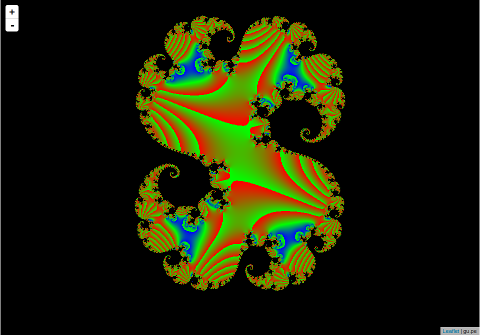
Recently I’ve been playing with golang and LeafletJS. As a small project I decided to knock together a fractal slippy map with a golang based map server which dynamically creates the fractal tile images. The whole thing can be reverse proxied via nginx to take the load off the server. The projects totals less than 200 lines of golang as JS and these are my design notes. You can see the final project here and grab the code on github here.

The HTML

The HTML is extremely simple, the map is a single div:

<div id="map" style="width: 100px; height: 100px; display: inline-block;"></div>

Which is then populated by LeafletJS as follows:

<script src="leaflet.js"></script>
<script>
  document.getElementById('map').style.width  = window.innerWidth-321 + "px";
  document.getElementById('map').style.height = window.innerHeight-20 + "px";
  
  var map = L.map('map').setView([-10, -360], 2);

  L.tileLayer('http://gu.pe/map/map/{z}/{x}/{y}.png', {
    maxZoom: 18,
    attribution: 'gu.pe',
    id: 'example'
  }).addTo(map);
</script>

The first couple of lines ensure that the map is sized to fill the whole window. The rest just initialises LeafletJS and tells it where to fetch map files from. Map tiles are just simple 256×256 png images.

The golang server

Both the static html and the dynamically generated tiles are served via golang. Here’s the main function that initializes everything:

func main() {
  http.HandleFunc("/map/", handler)
  http.Handle("/", httpgzip.NewHandler(http.FileServer(http.Dir("."))))
  http.ListenAndServe(":8080", nil)
}

I’m using the httpgzip package which allows golang to server serve gzip compressed content. This wraps the standard golang file server on line 3 above. A hander is registered on /map/ and this is where the png tile images are generated.

func handler(w http.ResponseWriter, r *http.Request) {

  // URLs here look like http://localhost:8080/map/13/4100/2724.png
  //                                               z  x    y

  tile_size   := 256
  tile_size_f := float64(256)

  // splits out the URL to get the x,y,z coordinates
  spliturl := strings.Split(r.URL.Path, "/")
  tile_zi, _ := strconv.Atoi(spliturl[2])
  tile_z := float64(tile_zi)
  tile_xi, _ := strconv.Atoi(spliturl[3])
  tile_x := float64(tile_xi)-1
  tile_yi, _ := strconv.Atoi(strings.Split(spliturl[4],".")[0])
  tile_y := float64(tile_yi)-1
  fmt.Printf("Input: %f %f %f\n", tile_z,tile_x,tile_y)

  w.Header().Set("Content-Type","image/png")

  myimage := image.NewRGBA(image.Rectangle{image.Point{0,0},image.Point{tile_size,tile_size}})

  // This loop just fills the image tile with fractal data
  for cx := 0; cx < tile_size; cx++ {
    for cy := 0; cy < tile_size; cy++ {

      cx_f := float64(cx)
      cy_f := float64(cy)

      i := complex128(complex(0,1))

      zoom := float64(math.Pow(2,float64(tile_z-2)))

      tile_range   := 1/zoom
      tile_start_x := 1/zoom + (tile_range*tile_x)
      tile_start_y := 1/zoom + (tile_range*tile_y)

      x := -2 + tile_start_x + (cx_f/tile_size_f)*tile_range
      y := -2 + tile_start_y + (cy_f/tile_size_f)*tile_range

      // x and y are now in the range ~-2 -> +2

      z := complex128(complex(x,0)) + complex128(complex(y,0))*complex128(i)

      c := complex(0.274,0.008)
      for n := 0; n < 100; n++ {
        z = z*z + complex128(c)
      }

      z = z *10
      ratio := float64(2 * (real(z)/2))
      r     := math.Max(0, float64(255*(ratio - 1)))
      b     := math.Max(0, float64(255*(1 - ratio)))
      g     := float64(255 - b - r)
      col := color.RGBA{uint8(r),uint8(g),uint8(b),255}
      myimage.Set(cx,cy,col)
    }
  }

  png.Encode(w, myimage)
}

The bulk of the code is related to the Julia set generation. PNGs are relatively easy to generate and serve in golang, and I previously wrote up my notes on doing that here. The code that splits out the URL is also a mess, I guess something like sscanf would have made a better job of this? However I’m not sure what the canonical way of doing this in golang is.

Serving server generated PNGs over HTTP in golang

Building on the PNG generation code. We can easily expand this to serve the content over HTTP.

The following example will serve content from the filesystem for everything but “/images”. This path will generate and send a random 100×100 PNG to the client.

package main

import (
    "github.com/daaku/go.httpgzip"
    "net/http"
    "image"
    "image/png"
    "image/color"
    "math/rand"
)

func handler(w http.ResponseWriter, r *http.Request) {
  myimage := image.NewRGBA(image.Rectangle{image.Point{0,0},image.Point{100,100}})

  // This loop just fills the image with random data
  for x := 0; x < 100; x++ {
    for y := 0; y < 100; y++ {
      c := color.RGBA{uint8(rand.Intn(255)),uint8(rand.Intn(255)),uint8(rand.Intn(255)),255}
      myimage.Set(x,y,c)
    }
  }

  png.Encode(w, myimage)
}

func main() {
  http.HandleFunc("/images", handler)  
  http.Handle("/", httpgzip.NewHandler(http.FileServer(http.Dir("."))))

  http.ListenAndServe(":8080", nil)
}

Creating a PNG image in golang

The following very simple example creates a PNG image file in golang. It first creates a Image structure and then populates this with random data.

A file is then creating using os.Create, this is used as a io.Writer to which golang’s PNG encoder in image/png writes the encoded PNG data via the png.Encode function.

package main

import (
    "image"
    "image/png"
    "image/color"
    "os"
    "math/rand"
)


func main() {

  myimage := image.NewRGBA(image.Rectangle{image.Point{0,0},image.Point{100,100}})

  // This loop just fills the image with random data
  for x := 0; x < 100; x++ {
    for y := 0; y < 100; y++ {
      c := color.RGBA{uint8(rand.Intn(255)),uint8(rand.Intn(255)),uint8(rand.Intn(255)),255}
      myimage.Set(x,y,c)
    }
  }

  myfile, _ := os.Create("test.png")

  png.Encode(myfile, myimage)
}