SecurityTube, Wireless Lan Security Megaprimer notes: part 8 (Hacking Authentication, WEP is broken)

Vivek’s video is here.

This lesson gives you a taste of how broken WEP is. The encryption method sucks.
We’ll break the authentication process, this doesn’t give you access to the network, but it’s the first step. The conclusions will also show that this technique allows you to inject packets of 128 bytes and decrypt the first 128 bytes of any packet. This is all without any brute forcing, the protocol is just broken.

Authentication types

* Open Authentication
* Shared Authentication

* Open Auth:
* no actual authentication, just exchange 2 packets.
* edge cases where it can fail (e.g. MAC filtering)

* Shared Authentication
* WEP encryption
* WEP requires 2 things: “IV” (initialisation vector) and “encryption key”
* Uses RC4 encryption algorithm.
* Encrypted stream is XOR’d with cleartext to encrypt.

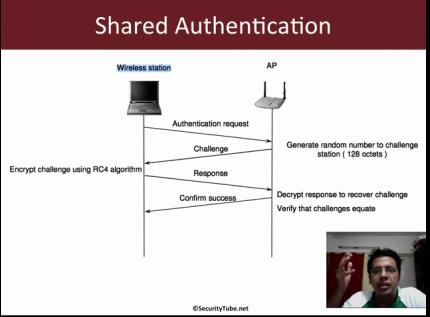
* Challenge is 128 byte plaintext (random, created by AP)
* Client encrypts it, with random IV.
* Access point checks this against it’s own encryption.
0. Setup an access point and client using WEP encryption, shared authentication.

1. Find the channel of the AP using airodump as before:

airodump-ng mon0 # make a note of the channel and BSSID of the target network

2. Use airodump to capture packets on this channel:

airodump-ng --channel NN mon0 --bssid APBSSID --write demo

3. Connect a client
3.1 Notice that the AUTH column changes and now says “SKA”.

4. Quit airodump. Run wireshark on the capture file:

wireshark demo-01.cap

4.1 Add a filter to show packets to/from our AP and to show auth packets only. You can add auth packets by right clicking and selecting “apply as filter”->”and selected”. You filter should look something like this:

(wlan.addr == APMACADDR) && (wlan.fc.type_subtype == 0x0b)

4.2 You should be able to see 4 packets:
* Check the “Auth SEQ”s you should see packets with SEQ numbers 1,2 and 4 (SEQ3 only shows data).
* SEQ1: The authentication request
* SEQ2: The authentication challenge, containing the challenge text (to be encrypted)
* SEQ3: Encrypted challenge text, with a random IV of the clients choice.
* SEQ4: AP, decrypts the packet. Checks everything is ok and sends success code.

5. Attacker can probe the exchange (like we just did).
5.1 We have the cleartext and the encrypted text.
5.2 Because the encrypted text = cleartext XOR keystream we can extract the keystream easily.
keystream = cleartext XOR encrypted text.
5.3 Uses the IV and the keystream we can authenticate!

5.4 airodump will do it for you. When you made the dump above it should have created a file called demoXXX.xor
5.4.1 It looks like this doesn’t always work, apparently due to broken Access point implementations… (see here)

6. Use aireplay to auth:

aireplay-ng --fakeauth 10 mon0 -e SecurityTube -y demoXXX.xor

6.1 You should see that the authenication is successful.

5. Attacker can probe the exchange (like we just did).
5.1 We have the cleartext and the encrypted text.
5.2 Because the encrypted text = cleartext XOR keystream we can extract the keystream easily.
keystream = cleartext XOR encrypted text.
5.3 Uses the IV and the keystream we can authenticate!

5.4 airodump will do it for you. When you made the dump above it should have created a file called demoXXX.xor
5.4.1 It looks like this doesn’t always work, apparently due to broken Access point implementations…

6. Use aireplay to auth:

aireplay-ng --fakeauth 10 mon0 -e SecurityTube -y demoXXX.xor

6.1 You should see that the authenication is successful.
6.2 Capture the fakeauthentication process with airodump and take a look at it in wireshark.

7. We’ve broken the authenication, so now what?
7.1 We can encrypt small packets and inject them (128bytes)
7.2 IV and keystream can be harvested from packet capture, and we can decrypt first 128 of all packets.

Conclusion: Shared key authentication is broken!

SecurityTube, Wireless Lan Security Megaprimer notes: part 7 (MAC Filtering)

The SecurityTube video is here.

MAC filtering comes from wired networking. MAC addresses can be spoofed easily. We can sniff packets and find mac addresses. This way we can easily get a valid MAC, spoof it and get access to the network.

0. Turn on MAC filtering on your AP and allow a client (e.g. your iPhone)

1. Perform a capture with wireshark as before.
1.1 Add a filter on the AP address it should look like this: “wlan.addr == APMACADDRESS”
1.2 Add a filter to remove beacon frame (right click type/subtype on a beacon frame, and apply as “and not” filter.

2. Attempt to connect using aireplay:

aireplay-ng --fakeauth 10 -e ESSIDNAME (e.g. SecurityTube) mon0

2.1 Run wireshark while doing the above.
2.2 Check that you can see “Unspecified failure (0x0001)”.

3. Fire up aerodump again, montioring the channel that your AP is on:

aerodump-ng mon0 --channel XX

You should see your AP listed in the first list. Note it’s BSSID here. Then look down the second list, which shows station, you should see the same BSSID. Next to this BSSID will be a station MAC address. Make a note of this MAC address, it’s the client connected to the AP.

4. Try to authenticate using that MAC address:

aireplay-ng --fakeauth 10 -e ESSIDNAME mon0 -h MACADDRESSFROM3

Fire up wireshark while you’re doing this, check that you can see “Successful (0x0000)”.

MAC address filtering is useless!

SecurityTube, Wireless Lan Security Megaprimer notes: part 6 (Finding hidden SSIDs)

The video is here.

Hidden SSID means, to turn off SSID broadcasting in the beacon frames.

* Beacon frames have NULL in SSID (tag length is 0)

* A security though obscurity technique.

Set your AP not to broadcast it’s SSD, check that the SSID length is 0 in wireshark.

While the beacon frame does not contain the SSID, Probe and association request packets do!

Passive solution: Monitor for connections extract SSID from Probe/association request packets.

Passive Method

aerodump-ng mon0 # Find the access point with ESSID <length: 0>
iwconfig wlan0 channel XX #set the channel of the access point above
wireshark # start a capture as usual, run it in the background
aerodump-ng mon0 --channel <CHANNEL> # fire up aerodump on the channel found above

Now connect a client, aerodump will automatically figure out the network name and show it.

Also take a look at the wireshark dump and see if you can find the SSID.

Active Method

Force the network to send Probe/Association packets. We’re going to force de-authanticate one or all clients.
They will reconnect and then we can grab the SSID.

To send deauthentication packets:

aireplay-ng --deauth 0 -a HIDDENAPMAC mon0

While your running the above command, have aerodump-ng running in another window, you should see the SSID appear here.

SecurityTube, Wireless Lan Security Megaprimer notes: part 5 (Dissecting WLAN Headers)

Vivek’s video is here.

Basic Terminology

STA: Station (Wireless Client)

BBS: Basic Services Set (AP and clients in infrastructure or Ad-Hoc Clients)
* Infrastructure BSS: Setup using Access point
* Independent BSS: Ad-Hoc network

BSSID: Basic Service Set Identifier
* Infrastructure Mode: MAC address of AP
* Ad-hoc Mode: Randomly chosen address by first device. (IBSS)

DS: Distribution System (connects APs in ESS).
* The LAN connecting APs together.

ESS: Extended Service Set (set of BSSs)
* Basically everything (BSSs + DS)

WLAN Packet Header

Looking at a beacon frame (could be any frame)

0. Open a frame in wireshark
0.1 Take a look at the “Frame section”
* Contains meta information about the packet, received time etc.

0.2 Take a look at the “Radiotap Header”
* Received from card
* Signal strength (Useful for intrusion detection, can be used to triangulate clients)
* Channel frequency etc.

0.3 WLAN Headers, open “IEEE 802.11 Beacon Frame” section
* Frame type information (subtype)

1. All WLAN Packets have the following fields:
* Frame Control (2 bytes)
* Duration/ID (2 bytes)
* Address 1 (6 bytes)
* FCS (4 bytes) (Checksum)

1.1 Frame Control:
* Bitfield containing a bunch of information:
* Protocol
* Default value 0, may change with major revision (currently always 0)

* Type/Subtype
* Type – Management, Control or Data frame
* Sub-types of each of these.

* To DS and From DS
* Indicate where the packet is going:

To DS From DS Info
0 0 STA to STA in the same IBSS (ad-hoc) or management and control frame
0 1 Exiting the Distribution System (DS) (e.g. AP to client)
1 0 Entering the DS (e.g. client to AP)
1 1 Used in Wireless Distribution System (WDS, e.g. extending Wifi network)

* More frag: are more fragments of frame following (data and management only).
* Retry: Indicates that this frame is a retransmission (data and management only).

* Power Management: Indicates if client is in power save mode or active mode. (power save e.g. battery)
* More Data: Indicates that there’s more data queued up to be sent.
* Protected frame: Indicates if frame body in encrypted or not.
* Order: Indicates that all frames must be processed in order.

Check you can see all this in wireshark (Type and subtype are shown twice)

1.2 Duration/ID field
* Used to set “NAV” (Network Allocation Vector).
* NAV is the minimum time to wait before transmission
(tells other clients please wait this long for this packet transmission to complete)

1.3 Address fields
* Depends on type/sub-type (Source address, destination address, BSSID address)

1.4 Sequence Control
* Sequence number of the packet AND Fragment number of the packet.

Check you can see all this in wireshark!

1.5 QoS (quality of service)…

1.6 Frame body: The data payload
* management frame information
* data transmission

1.7 FCS: CRC check over the MAC header and Frame body
* Easy to “fix” FCS if we modify the frame.