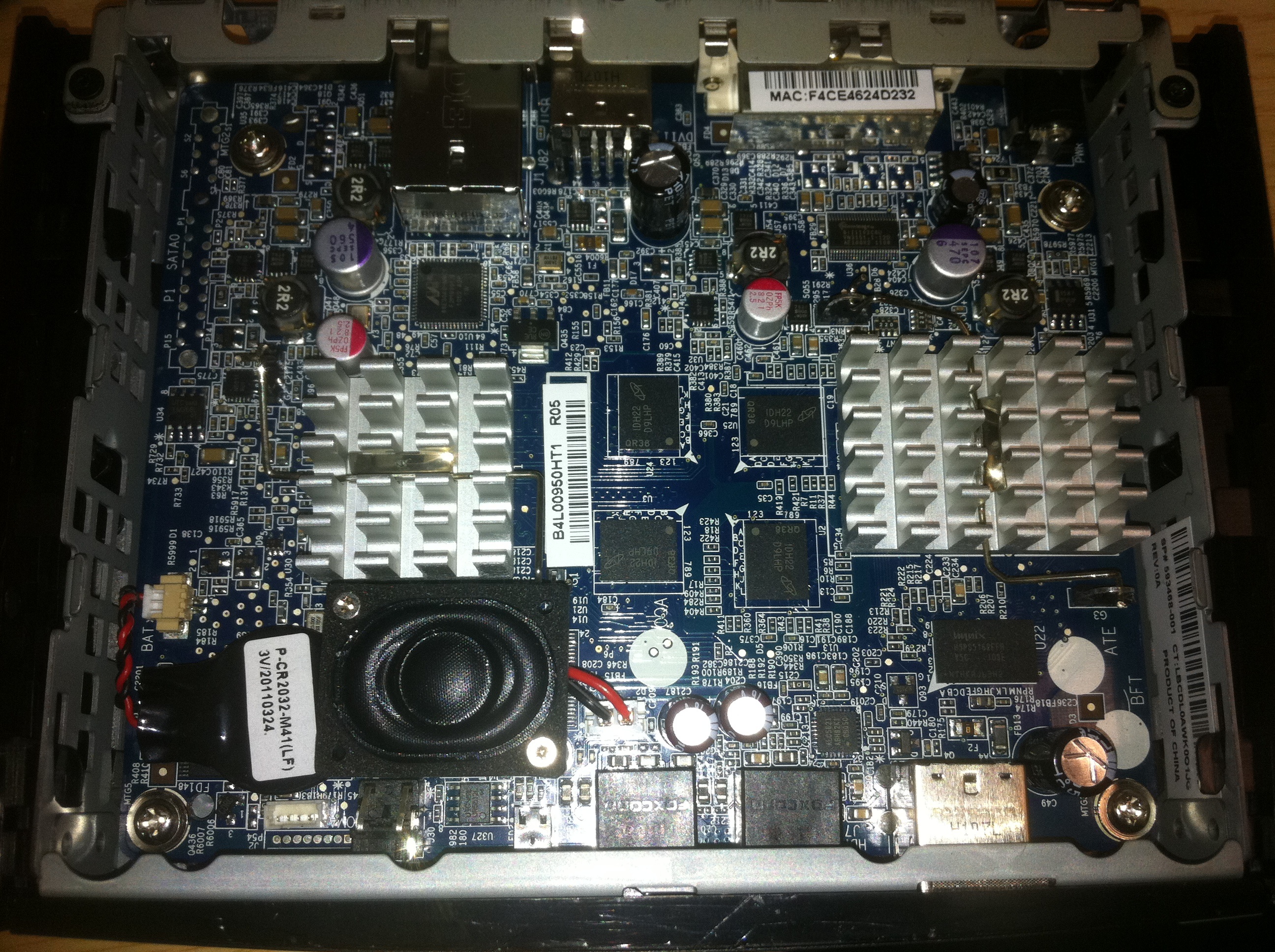
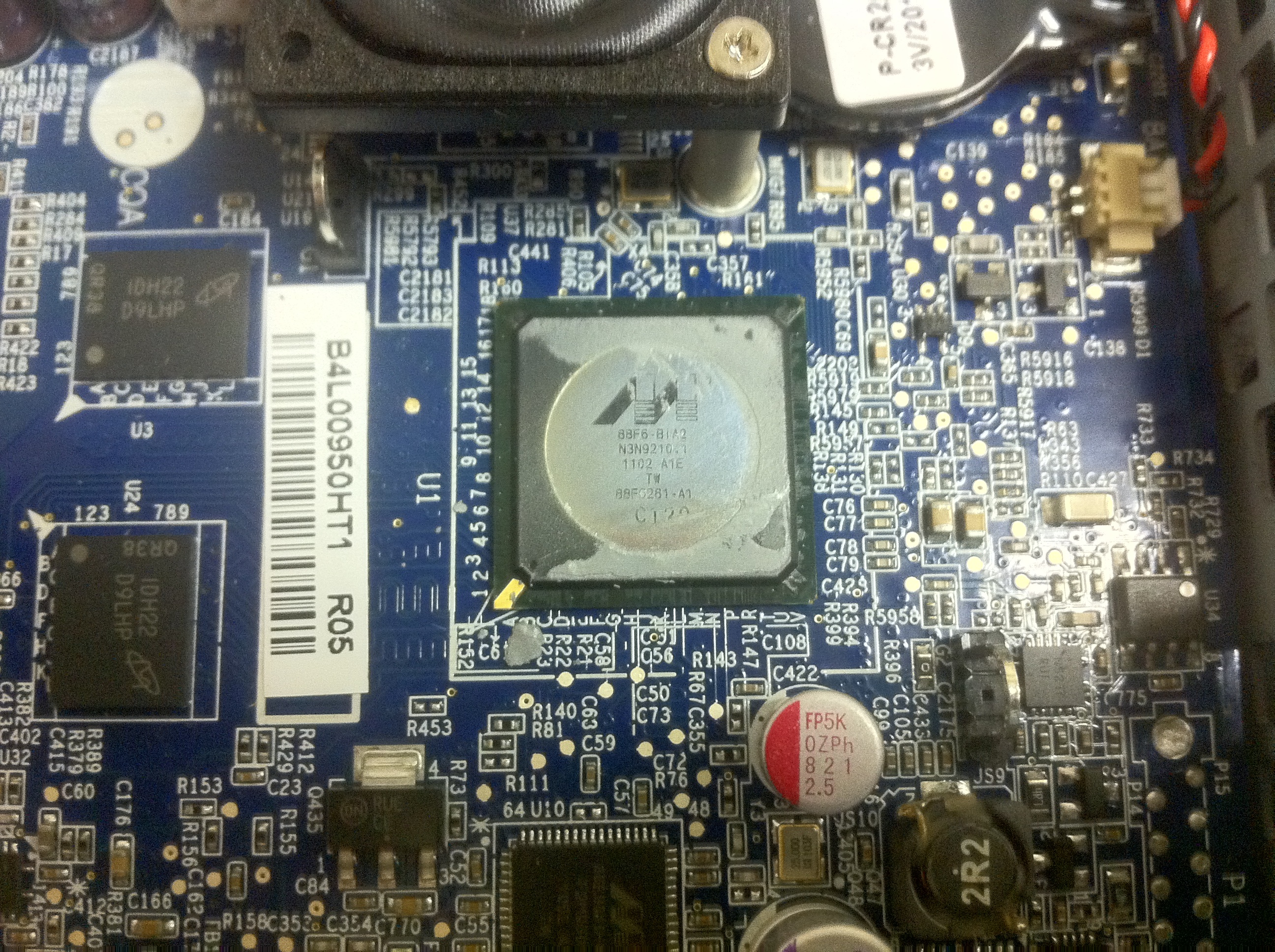
HP t5325 thin client PCB

The HP t5325 thin clients run Linux and some custom software to fire off terminal sessions. Anyway they use an ARM processor and some strange Volari IC I’ve not seen before.

The ARM process is a Marvell IC labeled: 88F6-BIA2 N3N921041 1102 A1E TW 89F6261-A1

The XGI Volari Z11 is odd, will have to try and find more information on this.. labelled WC0010 W1104CB. Looks like it’s a graphics processor of some kind.

3.8mm laser diode jammed in to aixiz 5.6mm module

There doesn’t seem to be a laser housing available that will take a 4.8mm diode. So I was forced to jammed a 3.8mm diode in to a standard 5.6mm aixiz module. This isn’t entirely sensible, but we’re playing with burning laser ripped out of DVD drives, the train for sensible town left long ago my friend.

I removed the 3.8mm diode from the drive but left it in it’s heatsink, I then cut away just enough of the heatsink so that it would fit in to the housing. I stuff some solder in the gaps just for good measure:

Unfortunately the driver I’m using, an OFL144, doesn’t fit in the housing either, so I’ve clamped the whole thing in a bent piece of metal. Pretty aint it:

SecurityTube, Wireless Lan Security Megaprimer notes: part 10 (Hacking Isolated Clients)

Vivek’s video is here.

You may have noticed that your phone or laptop autoconnects to wifi networks you’ve used before.
In this part Vivek discusses this behaviour and shows how it can be exploited.

Clients acquire preferred lists of SSIDs as they connect to different networks.

When the client is isolated, it will send out “Probe Request” packets to try and find the networks it already knows about.

0. Make sure your monitor mode interface (mon0 is up and running as before).

SSID is case sensitive.

1. You’ll need a client which you’ve previously connected to a number of networks.
Leave the Wifi on, but don’t associate with any network.

2. Load airodump, you should be able to see the client probing for various networks.

3. Start a wireshark capture as usual.

3.1 Use the mac address of the client from airodump like so:

wlan.addr == MACADDRESS

You should see a bunch of “Probe Request” packets. You should see probe requests for all the networks your client knows about.

You should note that different operating systems behave differently. Newer OSs don’t auto-connect to open networks.

Use Cases:

4. Open network, no encryption.

Attacker sniff Probe Request for a network.
Attacker sends a “Probe Response” saying “Yes I’m that network”.
Target is connected to attackers fake access point.
Attacker can attack the client at the IP level.

This is possible because SSID alone is used which network to connect to.

4.1 We can use airbase-ng to create a fake AP as before:

airbase-ng --essid SecurityTube -a AA:AA:AA:AA:AA:AA mon0

Note: You can add a “-v” to airbase-ng which displays a lot of interesting information.

4.2 Fire up wireshark add a filter for the MAC: AA:AA:AA:AA:AA:AA, the filter should look like this (where MACADDRESS is the MAC of your client previously found):

(wlan.addr == MACADDRESS) && (wlan.addr == AA:AA:AA:AA:AA:AA)

5. airbase-ng respond to everything!

airbase-ng can be configured to respond to /ALL/ probe requests:

airbase-ng -P -a AA:AA:AA:AA:AA:AA mon0

-C can also be used to send of beacon packets for networks probed too, neat!

airbase-ng -C 10 -P -a AA:AA:AA:AA:AA:AA mon0 -v

Vivek shows this iPhone hopping between different wifi networks which his fake AP is broadcasting.

We’ll discuss how to can use this behaviour with encrypted networks in later lessons.

SecurityTube, Wireless Lan Security Megaprimer notes: part 9 (Hotspot attack basics)

Vivek’s video is here.

Vivek shows you how to setup a fake software access point and force existing clients to connect to it in preference to the original access point. From this point a number of attacks could be launched, including man-in-the-middle attacks. These attacks are not discussed in detail here.

Wireless hotspots are usually Open Auth, sometimes have MAC filtering, no encryption (can’t really work here). May have application layer authentication (login portal).

Attacks

* Create an “evil twin”:
* Same ESSID
* Same BSSID (optional)

* Use de-auth to break client connections

* If our “evil” network has higher strength, then client will connect to it preferentially.

* Further attack options then exist. (metasploit the client, man in the middle)

0. Locate your target network with airodump. (For the lab setup an AP with no encryption, in the examples it’s called SecurityTube)

1. Use airbase-ng to create an access point.

iwconfig wlan0 channel NN # can be any channel
airbase-ng -a AA:AA:AA:AA:AA:AA -e SecurityTube mon0

This access point has 2 interfaces. One is mon0, the wireless interface.
airbase-ng creates a virtual network device called at0. This is the wired side of access point.

2. Bring up the virtual interface

ifconfig at0 up

That was just to test things out, kill airbase-ng.

3. Connect a client to the real access point.

4. Deauth all clients

iwconfig channel NN # same channel as REAL AP.
aireplay-ng --deauth 0 -a BSSID_OF_REAL_AP mon0 # BSSID found in airodump

Leave this running in the background.

5. Bring up airbase-ng again. In this case, we’re running airbase on the same channel (so we can send deauths in the background).

airbase-ng -a AA:AA:AA:AA:AA:AA -e SecurityTube mon0 # BSSID can be anything.

6. Try and connect your client again. Your client should connect to your soft access point.

7. Capture some data with wireshark on at0.

ifconfig at0 up #bring up at0

After a while, the client will give up trying to obtain a DHCP address.
It will assign itself an autoconfig address. You’ll see this in wireshark.
Source address will be listed as 169.x.x.x, in Vivek’s case he saw IGMP packets.

8. Assign at0 an address in this range and attempt to ping the client:

ifconfig at0 169.254.174.XX netmask 255.255.255.0 up #where 169.254.174.XX is an address in the same range as the client.
ping <address found in wireshark>

You can now access the client at the IP level.