Archive for the ‘Uncategorized’ Category.

STM32-Discovery on Linux

stm32

The following instructions should work for the STM32-Discovery (STM32F101 based device) and STM32f4-discovery (STM32F4 based device). The support tools are the same, the code obviously needs to be different. The instructions assume Debian Jessie.

#get compilers, a other reqs.
sudo apt-get install gdb-arm-none-eabi gcc-arm-none-eabi libstdc++-arm-none-eabi-newlib libnewlib-arm-none-eabi
sudo apt-get install autoconf pkg-config libusb-1.0 git

# get stlink, compile and install
git clone https://github.com/texane/stlink.git
cd ~/stlink
./autogen.sh
./configure
make
sudo make install
#install the modprobe exceptions
sudo cp stlink_v1.modprobe.conf /etc/modprobe.d
sudo modprobe -r usb-storage && modprobe usb-storage

# Grab the code example (originally from <a href="http://gostm32.blogspot.jp/2010/09/blinky-ii.html">this useful blog post</a>)
cd ~
git clone https://github.com/new299/stm32vl_blinky.git
cd stm32vl_blinky
make
sudo make burn

st-link seems a bit flakey, and I never get 100% of flashes to verify correctly. However it mostly seems to program correctly. Ocassionally it reports the incorrect amount of flash. I’ve found that hitting reset during a flash sometimes seems to kick it into functioning correctly again.

Slippy maps

I’ve been looking at Javascript, googlemap-like maps. It seems that these are called “slippy maps”.

There’s some useful information of the Openstreetmap wiki here.

They recommend a few Javascript libraries, including LeafletJS and OpenLayers. I tried OpenLayers first, but it’s pretty big, just to get the examples working from github I’d need node.js/JVM etc…

I decided to play with LeafletJS, it was a lot quicker to get the examples working!

The LeafletJS demo pulls tile images from URLs that look like this:

https://c.tiles.mapbox.com/v3/examples.map-i875mjb7/13/4094/2724.png

I sptent some time trying to figure out how coordinates are translated into the URL. The above representing a tile near [51.505, -0.09] at zoom level 13. The 13 is obvious enough. However the latitude and longitude took some googling.

It seems that pretty much all mapping services use the Spherical Mercator projection (see wikipedia and openstreetmap ). There are a bunch of tools for making tile sets (particularly from flat images).

Anyway, I wanted to make my dataset manually at first to try things out. I created a directory structure that looks like this:

./13/4094/2723.png
./13/4094/2724.png
./13/4095/2723.png
./13/4095/2724.png
./13/4092/2723.png
./13/4092/2724.png
./13/4093/2723.png
./13/4093/2724.png

And used a modified version of the LeafletJS example, telling it to pull data from my server:

<!DOCTYPE html>
<html>
<head>
        <meta charset="utf-8" />

        <meta name="viewport" content="width=device-width, initial-scale=1.0">

        <link rel="stylesheet" href="leaflet.css" />
</head>
<body>
        <div id="map" style="width: 600px; height: 400px"></div>

        <script src="leaflet.js"></script>
        <script>

                var map = L.map('map').setView([51.505, -0.09], 13);

                L.tileLayer('http://192.168.0.12/maptest/{z}/{x}/{y}.png', {
                        maxZoom: 18,
                        attribution: '41j',
                        id: 'example'
                }).addTo(map);


                var popup = L.popup();

                function onMapClick(e) {
                        popup
                                .setLatLng(e.latlng)
                                .setContent("You clicked the map at " + e.latlng.toString())
                                .openOn(map);
                }

                map.on('click', onMapClick);

        </script>
</body>
</html>

This worked pretty well, and gives me a basis for trying other stuff out.

Notes

The C code which performs this conversion replicated from the OSM wiki is as follows:

#include <math.h>
#include <iostream>

using namespace std;

int long2tilex(double lon, int z) 
{ 
	return (int)(floor((lon + 180.0) / 360.0 * pow(2.0, z))); 
}
 
int lat2tiley(double lat, int z)
{ 
	return (int)(floor((1.0 - log( tan(lat * M_PI/180.0) + 1.0 / cos(lat * M_PI/180.0)) / M_PI) / 2.0 * pow(2.0, z))); 
}
 
double tilex2long(int x, int z) 
{
	return x / pow(2.0, z) * 360.0 - 180;
}
 
double tiley2lat(int y, int z) 
{
	double n = M_PI - 2.0 * M_PI * y / pow(2.0, z);
	return 180.0 / M_PI * atan(0.5 * (exp(n) - exp(-n)));
}

int main() {
  cout << long2tilex(-0.09,13) << endl;
  cout << lat2tiley(51.505,13) << endl;
}

Some data sources I’ve been thinking about look at.

OSM Data:
http://planet.openstreetmap.org/

Oil GIS Data:
https://www.gov.uk/oil-and-gas-offshore-maps-and-gis-shapefiles#offshore-gis-data

msp430f2013 I2C frustrations

display

UPDATE: See this post which shows how I finally got it working.

I’ve been trying to get a ST7032i based display working with a msp430f2013 on a EZ430-F2013. Unfortunately without much success. After hours of debugging I discovered that the glass on the display was fractured… guess I’ll be ordering some more.

Anyway, it did get as far as acknowledging my commands. And I found a working I2C sample. It was hidden pretty well on the TI site, I think in a zip called slac080l.zip. The file I was working from was msp430x20x3_usi_07.c. My hacked version is reproduced below, you can almost feel the frustration I’m sure (it’s an absolute mess). But it does work with the MSP430GCC compiler, and produce working I2C output.

/* --COPYRIGHT--,BSD_EX
 * Copyright (c) 2012, Texas Instruments Incorporated
 * All rights reserved.
 *
 * Redistribution and use in source and binary forms, with or without
 * modification, are permitted provided that the following conditions
 * are met:
 *
 * *  Redistributions of source code must retain the above copyright
 *    notice, this list of conditions and the following disclaimer.
 *
 * *  Redistributions in binary form must reproduce the above copyright
 *    notice, this list of conditions and the following disclaimer in the
 *    documentation and/or other materials provided with the distribution.
 *
 * *  Neither the name of Texas Instruments Incorporated nor the names of
 *    its contributors may be used to endorse or promote products derived
 *    from this software without specific prior written permission.
 *
 * THIS SOFTWARE IS PROVIDED BY THE COPYRIGHT HOLDERS AND CONTRIBUTORS "AS IS"
 * AND ANY EXPRESS OR IMPLIED WARRANTIES, INCLUDING, BUT NOT LIMITED TO,
 * THE IMPLIED WARRANTIES OF MERCHANTABILITY AND FITNESS FOR A PARTICULAR
 * PURPOSE ARE DISCLAIMED. IN NO EVENT SHALL THE COPYRIGHT OWNER OR
 * CONTRIBUTORS BE LIABLE FOR ANY DIRECT, INDIRECT, INCIDENTAL, SPECIAL,
 * EXEMPLARY, OR CONSEQUENTIAL DAMAGES (INCLUDING, BUT NOT LIMITED TO,
 * PROCUREMENT OF SUBSTITUTE GOODS OR SERVICES; LOSS OF USE, DATA, OR PROFITS;
 * OR BUSINESS INTERRUPTION) HOWEVER CAUSED AND ON ANY THEORY OF LIABILITY,
 * WHETHER IN CONTRACT, STRICT LIABILITY, OR TORT (INCLUDING NEGLIGENCE OR
 * OTHERWISE) ARISING IN ANY WAY OUT OF THE USE OF THIS SOFTWARE,
 * EVEN IF ADVISED OF THE POSSIBILITY OF SUCH DAMAGE.
 *
 *******************************************************************************
 * 
 *                       MSP430 CODE EXAMPLE DISCLAIMER
 *
 * MSP430 code examples are self-contained low-level programs that typically
 * demonstrate a single peripheral function or device feature in a highly
 * concise manner. For this the code may rely on the device's power-on default
 * register values and settings such as the clock configuration and care must
 * be taken when combining code from several examples to avoid potential side
 * effects. Also see www.ti.com/grace for a GUI- and www.ti.com/msp430ware
 * for an API functional library-approach to peripheral configuration.
 *
 * --/COPYRIGHT--*/
//******************************************************************************
//  MSP430F20xx Demo - I2C Master Transmitter, single byte
//
//  Description: I2C Master communicates with I2C Slave using
//  the USI. Master data is sent and increments from 0x00 with each transmitted
//  byte which is verified by the slave.
//  LED off for address or data Ack; LED on for address or data NAck.
//  ACLK = n/a, MCLK = SMCLK = Calibrated 1MHz
//
//  ***THIS IS THE MASTER CODE***
//
//                  Slave                      Master
//          (msp430x20x3_usi_08.c)
//               MSP430F20x2/3              MSP430F20x2/3
//             -----------------          -----------------
//         /|\|              XIN|-    /|\|              XIN|-
//          | |                 |      | |                 |
//          --|RST          XOUT|-     --|RST          XOUT|-
//            |                 |        |                 |
//      LED <-|P1.0             |        |                 |
//            |                 |        |             P1.0|-> LED
//            |         SDA/P1.7|<-------|P1.7/SDA         |
//            |         SCL/P1.6|<-------|P1.6/SCL         |
//
//  Note: internal pull-ups are used in this example for SDA & SCL
//
//  Z. Albus
//  Texas Instruments Inc.
//  May 2006
//  Built with CCE Version: 3.2.0 and IAR Embedded Workbench Version: 3.41A
//******************************************************************************
#include <msp430.h>


// commands
#define LCD_CLEARDISPLAY 0x01
#define LCD_RETURNHOME 0x02
#define LCD_ENTRYMODESET 0x04
#define LCD_DISPLAYCONTROL 0x08
#define LCD_CURSORSHIFT 0x10
#define LCD_FUNCTIONSET 0x20
#define LCD_SETCGRAMADDR 0x40
#define LCD_SETDDRAMADDR 0x80
#define LCD_EX_SETBIASOSC 0x10 // Bias selection / Internal OSC frequency adjust
#define LCD_EX_SETICONRAMADDR 0x40 // Set ICON RAM address
#define LCD_EX_POWICONCONTRASTH 0x50 // Power / ICON control / Contrast set(high byte)
#define LCD_EX_FOLLOWERCONTROL 0x60 // Follower control
#define LCD_EX_CONTRASTSETL 0x70 // Contrast set(low byte)
// flags for display entry mode
#define LCD_ENTRYRIGHT 0x00
#define LCD_ENTRYLEFT 0x02
#define LCD_ENTRYSHIFTINCREMENT 0x01
#define LCD_ENTRYSHIFTDECREMENT 0x00
// flags for display on/off control
#define LCD_DISPLAYON 0x04
#define LCD_DISPLAYOFF 0x00
#define LCD_CURSORON 0x02
#define LCD_CURSOROFF 0x00
#define LCD_BLINKON 0x01
#define LCD_BLINKOFF 0x00
// flags for display/cursor shift
#define LCD_DISPLAYMOVE 0x08
#define LCD_CURSORMOVE 0x00
#define LCD_MOVERIGHT 0x04
#define LCD_MOVELEFT 0x00
// flags for function set
#define LCD_8BITMODE 0x10
#define LCD_4BITMODE 0x00
#define LCD_2LINE 0x08
#define LCD_1LINE 0x00
#define LCD_5x10DOTS 0x04
#define LCD_5x8DOTS 0x00
#define LCD_EX_INSTRUCTION 0x01 // IS: instruction table select
// flags for Bias selection
#define LCD_BIAS_1_4 0x08 // bias will be 1/4
#define LCD_BIAS_1_5 0x00 // bias will be 1/5
// flags Power / ICON control / Contrast set(high byte)
#define LCD_ICON_ON 0x08 // ICON display on
#define LCD_ICON_OFF 0x00 // ICON display off
#define LCD_BOOST_ON 0x04 // booster circuit is turn on
#define LCD_BOOST_OFF 0x00 // booster circuit is turn off
#define LCD_OSC_122HZ 0x00 // [email protected]
#define LCD_OSC_131HZ 0x01 // [email protected]
#define LCD_OSC_144HZ 0x02 // [email protected]
#define LCD_OSC_161HZ 0x03 // [email protected]
#define LCD_OSC_183HZ 0x04 // [email protected]
#define LCD_OSC_221HZ 0x05 // [email protected]
#define LCD_OSC_274HZ 0x06 // [email protected]
#define LCD_OSC_347HZ 0x07 // [email protected]
// flags Follower control
#define LCD_FOLLOWER_ON 0x08 // internal follower circuit is turn on
#define LCD_FOLLOWER_OFF 0x00 // internal follower circuit is turn off
#define LCD_RAB_1_00 0x00 // 1+(Rb/Ra)=1.00
#define LCD_RAB_1_25 0x01 // 1+(Rb/Ra)=1.25
#define LCD_RAB_1_50 0x02 // 1+(Rb/Ra)=1.50
#define LCD_RAB_1_80 0x03 // 1+(Rb/Ra)=1.80
#define LCD_RAB_2_00 0x04 // 1+(Rb/Ra)=2.00
#define LCD_RAB_2_50 0x05 // 1+(Rb/Ra)=2.50
#define LCD_RAB_3_00 0x06 // 1+(Rb/Ra)=3.00
#define LCD_RAB_3_75 0x07 // 1+(Rb/Ra)=3.75


char MST_Data = 0x40;                     // Variable for transmitted data
char SLV_Addr = 0x7C;                  // Address is 0x48 << 1 bit + 0 for Write
int I2C_State = 0;                     // State variable

int main(void)
{
  volatile unsigned int i;             // Use volatile to prevent removal

  WDTCTL = WDTPW + WDTHOLD;            // Stop watchdog
                __delay_cycles(250000);
  if (CALBC1_1MHZ==0xFF)			   // If calibration constants erased
  {											
    while(1);                          // do not load, trap CPU!!	
  }
  DCOCTL = 0;                               // Select lowest DCOx and MODx settings
  BCSCTL1 = CALBC1_1MHZ;               // Set DCO
  DCOCTL = CALDCO_1MHZ;

  P1OUT = 0xC0;                        // P1.6 & P1.7 Pullups, others to 0
  P1REN |= 0xC0;                       // P1.6 & P1.7 Pullups
  P1DIR = 0xFF;                        // Unused pins as outputs
  P2OUT = 0;
  P2DIR = 0xFF;

  USICTL0 = USIPE6+USIPE7+USIMST+USISWRST; // Port & USI mode setup
  USICTL1 = USII2C+USIIE;              // Enable I2C mode & USI interrupt
  USICKCTL = USIDIV_3+USISSEL_2+USICKPL; // Setup USI clocks: SCL = SMCLK/8 (~125kHz) // was USIDIV_3
  USICNT |= USIIFGCC;                  // Disable automatic clear control
  USICTL0 &= ~USISWRST;                // Enable USI
  USICTL1 &= ~USIIFG;                  // Clear pending flag
  __enable_interrupt();

  int a=0;
  for(int n=0;;n++)
  {
    if(n==0) MST_Data = 0x00;
    if(n==1) MST_Data = LCD_EX_SETBIASOSC | LCD_BIAS_1_5 | LCD_OSC_183HZ;
    if(n==2) MST_Data = 0x00;
    if(n==3) MST_Data = LCD_EX_FOLLOWERCONTROL | LCD_FOLLOWER_ON | LCD_RAB_2_00;
    if(n==4) MST_Data = 0x00;
    if(n==5) MST_Data = LCD_DISPLAYON | LCD_CURSORON | LCD_BLINKON;
    if(n==6) MST_Data = 0x00;
    if(n==7) MST_Data = LCD_ENTRYMODESET | LCD_ENTRYLEFT;

    if(n==9) MST_Data = 0x00;
    if(n==10) MST_Data = LCD_EX_CONTRASTSETL | (0x0c & 0x0f);
    if(n==11) MST_Data = 0x00;
    if(n==12) MST_Data = LCD_EX_POWICONCONTRASTH | LCD_ICON_ON | LCD_BOOST_ON | ((0x0c >> 4) & 0x03);
    if(n==14) MST_Data = 0x00;
    if(n==15) MST_Data = LCD_CLEARDISPLAY;
    if(n==16) MST_Data = 0x00;
    if(n==17) MST_Data = 0x40;
    if(n==18) MST_Data = 'a'+a;
    USICTL1 |= USIIFG;                 // Set flag and start communication
    LPM0;                              // CPU off, await USI interrupt
   // __no_operation();                  // Used for IAR
//    for (i = 0; i < 5000; i++);        // Dummy delay between communication cycles
    P1OUT &= ~0x01;           // LED off
    __delay_cycles(500000);
    if(n==18)n=16;
    a++;
  }
}

/******************************************************
// USI interrupt service routine
******************************************************/
#if defined(__TI_COMPILER_VERSION__) || defined(__IAR_SYSTEMS_ICC__)
#pragma vector = USI_VECTOR
__interrupt void USI_TXRX (void)
#elif defined(__GNUC__)
void __attribute__ ((interrupt(USI_VECTOR))) USI_TXRX (void)
#else
#error Compiler not supported!
#endif
{
  switch(I2C_State)
    {
      case 0: // Generate Start Condition & send address to slave
              P1OUT &= ~0x01;           // LED off
              USISRL = 0x00;           // Generate Start Condition...
              USICTL0 |= USIGE+USIOE;
              USICTL0 &= ~USIGE;
              USISRL = SLV_Addr;       // ... and transmit address, R/W = 0
              USICNT = (USICNT & 0xE0) + 0x08; // Bit counter = 8, TX Address
              I2C_State = 2;           // Go to next state: receive address (N)Ack
              break;

      case 2: // Receive Address Ack/Nack bit
              USICTL0 &= ~USIOE;       // SDA = input
              USICNT |= 0x01;          // Bit counter = 1, receive (N)Ack bit
              I2C_State = 4;           // Go to next state: check (N)Ack
              break;

      case 4: // Process Address Ack/Nack & handle data TX
              USICTL0 |= USIOE;        // SDA = output
              if (USISRL & 0x01)       // If Nack received...
              { // Send stop...
                USISRL = 0x00;
                USICNT |=  0x01;       // Bit counter = 1, SCL high, SDA low
                I2C_State = 10;        // Go to next state: generate Stop
              //  P1OUT |= 0x01;         // Turn on LED: error
                P1OUT |= 0x01;         // Turn on LED: error
                __delay_cycles(5000000);
              }
              else
              { // Ack received, TX data to slave...
                USISRL = MST_Data;     // Load data byte
                USICNT |=  0x08;       // Bit counter = 8, start TX
                I2C_State = 6;         // Go to next state: receive data (N)Ack
                P1OUT &= ~0x01;        // Turn off LED
              }
              break;

      case 6: // Receive Data Ack/Nack bit
              USICTL0 &= ~USIOE;       // SDA = input
              USICNT |= 0x01;          // Bit counter = 1, receive (N)Ack bit
              I2C_State = 8;           // Go to next state: check (N)Ack
              break;

      case 8: // Process Data Ack/Nack & send Stop
              USICTL0 |= USIOE;
              if (USISRL & 0x01)       // If Nack received...
              ;//  P1OUT |= 0x01;         // Turn on LED: error
              else                     // Ack received
              {
                MST_Data++;            // Increment Master data
              //  P1OUT &= ~0x01;        // Turn off LED
              }
              // Send stop...
              USISRL = 0x00;
              USICNT |=  0x01;         // Bit counter = 1, SCL high, SDA low
              I2C_State = 10;          // Go to next state: generate Stop
              break;

      case 10:// Generate Stop Condition
              USISRL = 0x0FF;          // USISRL = 1 to release SDA
              USICTL0 |= USIGE;        // Transparent latch enabled
              USICTL0 &= ~(USIGE+USIOE);// Latch/SDA output disabled
              I2C_State = 0;           // Reset state machine for next transmission
              LPM0_EXIT;               // Exit active for next transfer
              break;
    }

  USICTL1 &= ~USIIFG;                  // Clear pending flag
}

Inside a 1USD Fingerprint reader

I picked up a finger print scanner on a whim in Akihabara the other day, it was only a dollar so I figured what the hell.

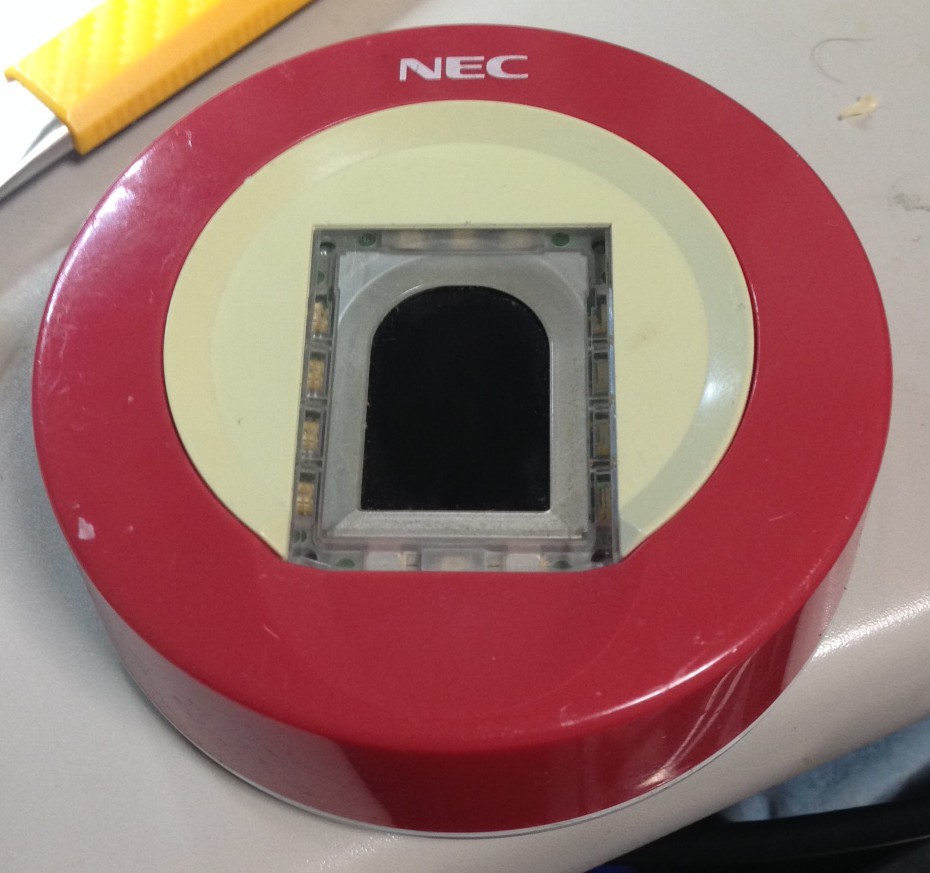
finger1

Looks pretty normal. I figured it would have a cheap USB controller inside.

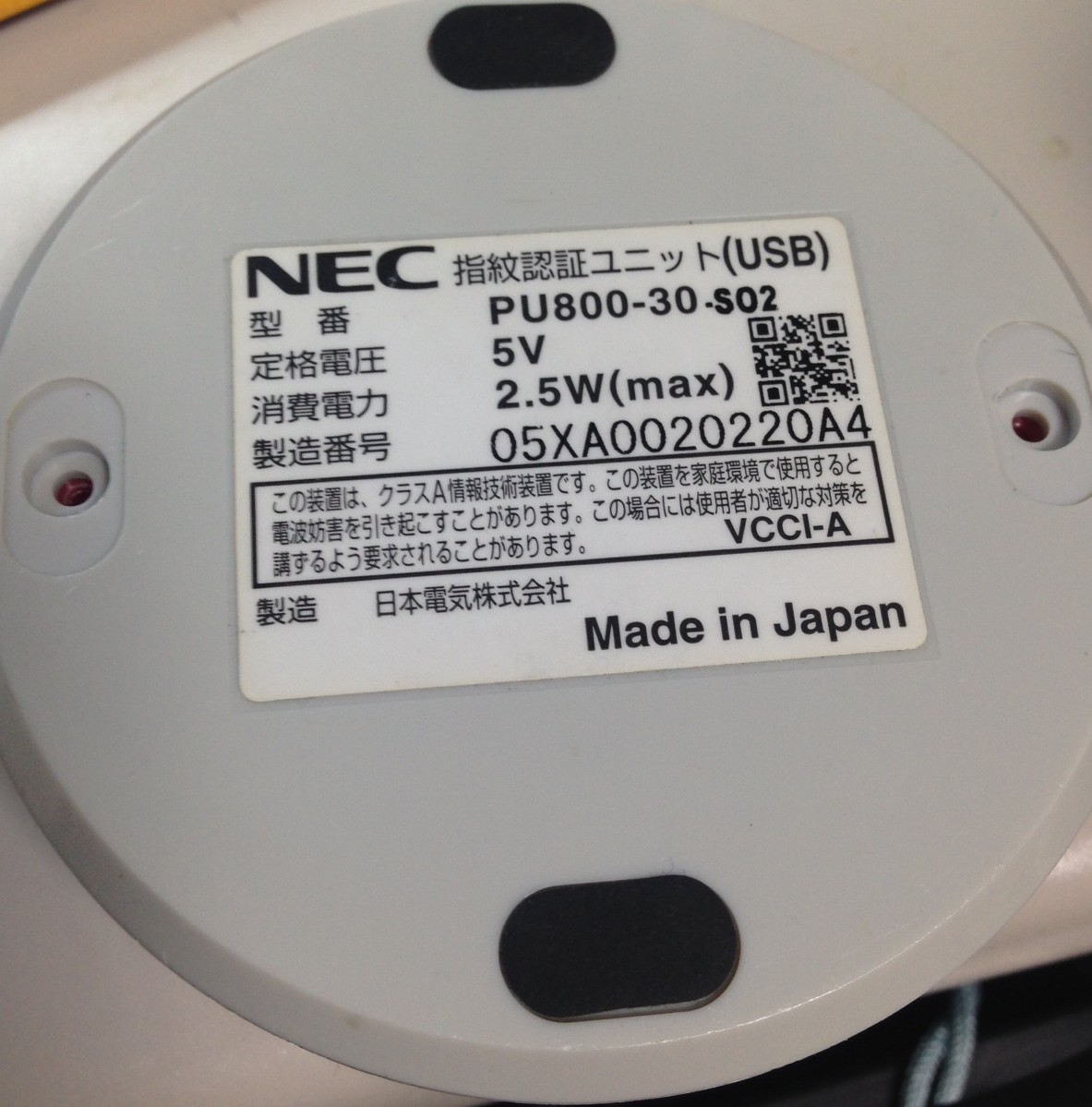
finger2

Model NEC PU800-30-S02. Hmm 2.5W… that seems kind of high…

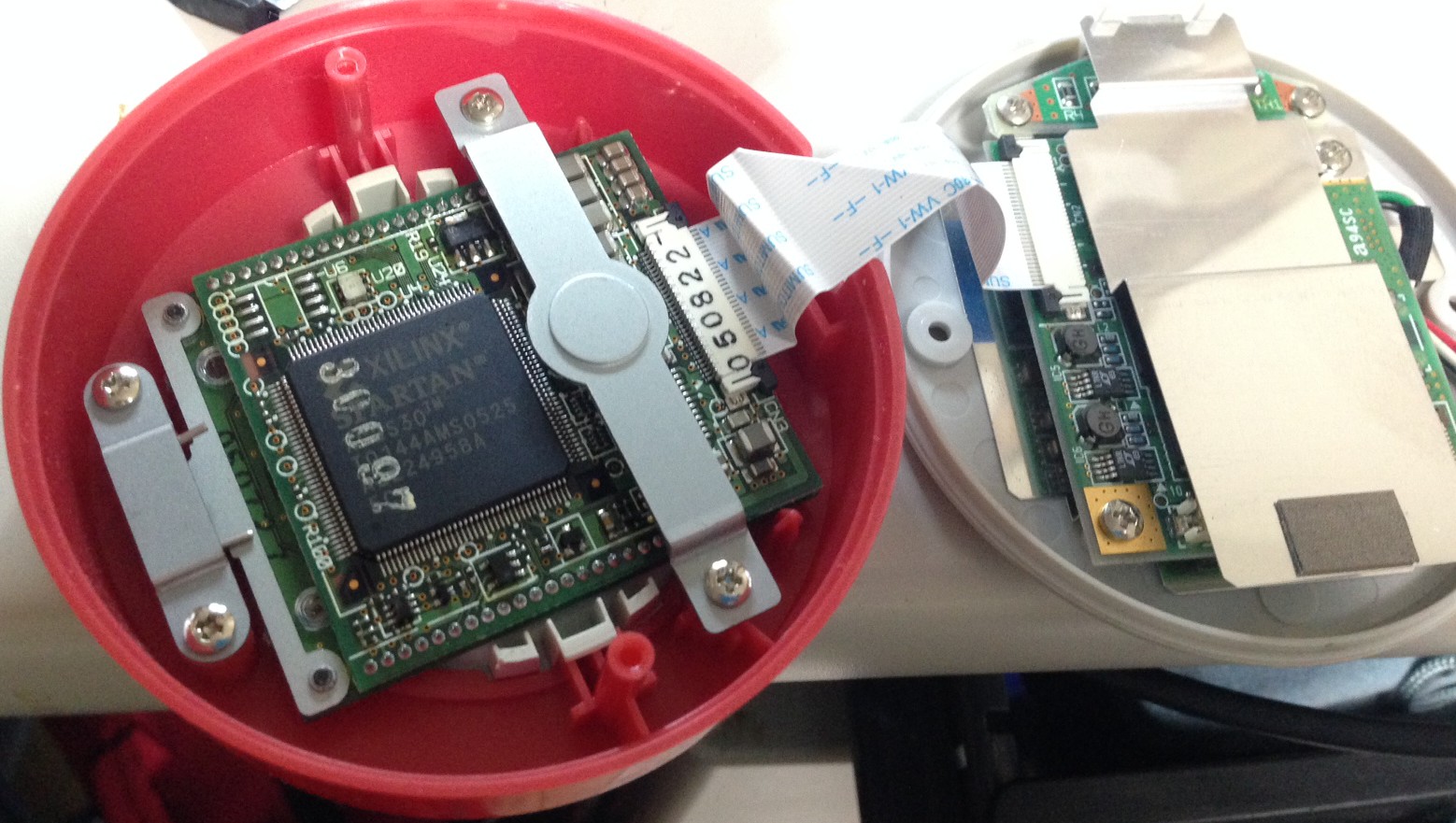
finger3

It’s got an FPGA in it!! Which explains the 2.5W I guess!

finger4

Not only that but a PXA255 too. Crazy powerful for what I assumed was a relatively dumb device.