Archive for the ‘Uncategorized’ Category.
September 30, 2011, 11:31 pm
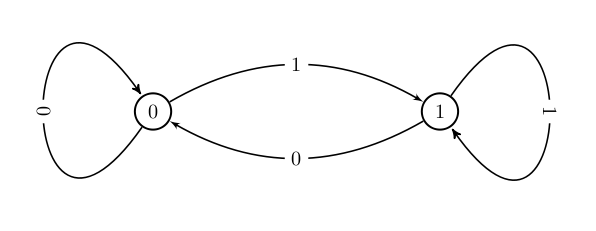
I recently wanted to use tkz-graph again and found the example below no longer works… here’s an updated version and a copy of the version of tkz-graph I used (old notes are below):
\documentclass{article}
\usepackage{slashbox}
\usepackage{graphicx}
\usepackage[utf8]{inputenc}
\usepackage[usenames,dvipsnames,pdftex]{xcolor}
\usepackage{fullpage}
\usepackage{tkz-graph}
%\usepackage[upright]{fourier}
\usepackage[left=3cm,top=3cm,right=3cm]{geometry}

\usetikzlibrary{arrows}
\thispagestyle{empty}
\title{Graph}
\begin{document}
\maketitle

\begin{center}
\begin{tikzpicture}[>=latex']
\tikzset{node distance = 5cm}
\GraphInit[vstyle=Normal]
\SetGraphUnit{4}
\Vertex{P}
\EA(P){A}

\tikzset{LabelStyle/.style = {fill=white,sloped}}
\Loop[label=$P$,dir=WE](P)
\Loop[label=$A$,dir=EA](A)
\tikzset{EdgeStyle/.style = {->,bend left}}
\Edge[label=$A$](P)(A)
\Edge[label=$P$](A)(P)
\end{tikzpicture}
\end{center}

\end{document}
tkz-graph
slashbox-sty
The tkz-graph documentation seems very good, but it’s in french. I don’t know french. However I managed to make a little graph with loops and edge labelling. I have to say I’m pretty impressed with the results. Here’s the Latex:
\documentclass{article}
\usepackage{slashbox}
\usepackage{graphicx}
\usepackage[utf8]{inputenc}
\usepackage[usenames,dvipsnames,pdftex]{xcolor}
\usepackage{fullpage}
\usepackage{tkz-graph}
%\usepackage[upright]{fourier}
\usepackage[left=3cm,top=3cm,right=3cm]{geometry}

\usetikzlibrary{arrows}
\thispagestyle{empty}
\title{Graph}
\begin{document}
\maketitle

\begin{center}
\begin{tikzpicture}[>=latex']
  \tikzset{node distance = 5cm}
  \GraphInit[vstyle=Normal]
  \Vertex{0}
  \EA(0){1}

  \tikzset{LabelStyle/.style = {fill=white,sloped}}
  \tikzset{EdgeStyle/.style = {->,bend left}}
  \Loop[label=$0$,dir=WE](0)
  \Loop[label=$1$,dir=EA](1)
  \Edge[label=$1$](0)(1)
  \Edge[label=$0$](1)(0)
\end{tikzpicture}
\end{center}

\end{document}

And here's how it renders:

That's actually a De Bruijn graph for alphabet size 2, k=2 if I've done it right.
September 30, 2011, 11:29 pm
The proxmark 3 is an rfid card reader/writer/simulator. I recently bought one to play with but it’s non trivial to get started with. These notes assume your looking at something like a Mifare Classic card. Plug in the proxmark 3. If you type lsusb you should see its ID appear:
Bus 003 Device 016: ID 9ac4:4b8f
I’m going assume the firmware is always programmed on to the device, if not you should follow the instructions on their wiki. I’m just going to build the client software. So, do the following:
sudo aptitude install subversion build-essential libreadline5 libreadline-dev libusb-0.1-4 libusb-dev libqt4-dev perl pkg-config

svn co http://proxmark3.googlecode.com/svn/trunk proxmark3-read-only
cd proxmark3-read-only
cd client
make
Attach the HF antenna. Attach the proxmark3 to the computer. Place the card on the device.
./proxmark3
Enter tune.
It will return you to the prompt immediately, but don’t enter anything wait 10 seconds or so for the results:
proxmark3> tune
> tune
#db# Measuring antenna characteristics, please wait.
proxmark3>

# LF antenna:  0.00 V @   125.00 kHz
# LF antenna:  0.00 V @   134.00 kHz
# LF optimal:  0.00 V @ 12000.00 kHz
# HF antenna: 10.51 V @    13.56 MHz
# Your LF antenna is unusable.
proxmark3>
You should get something similar to the above. the docs say anything over 5v is ok for the HF voltage. Now you should be ready to read the card. Enter hi14areader:
proxmark3> hi14areader
> hi14areader
#db# 00001933, 000000cc, 000000cc

#db# ready..
proxmark3>
That reads the data, but doesn’t print it. To do that you need hi14list:
proxmark3> hi14alist
> hi14alist
proxmark3> recorded activity:
 ETU     :rssi: who bytes
---------+----+----+-----------
 +      0:    :     52
 +     68:   0: TAG 04  00
 +    -68:    :     93  20
 +    144:   0: TAG eb  5c  96  69  48
 +   -144:    :     93  70  eb  5c  96  69  48  15  d4
 +    212:   0: TAG 08  b6  dd
 +   -212:    :     60  00  f5  7b
 +    337:   0: TAG 6c  7d  71  86
 +   -337:    :     52
 +      0:    :     52
 +    405:   0: TAG 04  00
 +   -405:    :     93  20
 +    481:   0: TAG eb  5c  96  69  48
 +   -481:    :     93  70  eb  5c  96  69  48  15  d4
 +    549:   0: TAG 08  b6  dd
 +   -549:    :     60  00  f5  7b
 +    674:   0: TAG c0  8f  b6  49
 +   -674:    :     52
 +      0:    :     52
 +    742:   0: TAG 04  00
 +   -742:    :     93  20
 +    810:   0: TAG eb  5c  96  69  48
 +   -810:    :     93  70  eb  5c  96  69  48  15  d4
 +    878:   0: TAG 08  b6  dd
 +   -878:    :     60  00  f5  7b
 +   1003:   0: TAG 36  fa  2c  3c
 +  -1003:    :     52
 +      0:    :     52
 +   1079:   0: TAG 04  00
 +  -1079:    :     93  20
 +   1147:   0: TAG eb  5c  96  69  48
 +  -1147:    :     93  70  eb  5c  96  69  48  15  d4
 +   1223:   0: TAG 08  b6  dd
 +  -1223:    :     60  00  f5  7b
 +   1340:   0: TAG 36  04  9c  65
 +  -1340:    :     52
 +      0:    :     52
 +   1416:   0: TAG 04  00
 +  -1416:    :     93  20
 +   1484:   0: TAG eb  5c  96  69  48
 +  -1484:    :     93  70  eb  5c  96  69  48  15  d4
 +   1560:   0: TAG 08  b6  dd
 +  -1560:    :     60  00  f5  7b
 +   1685:   0: TAG 9f  45  67  46
 +  -1685:    :     52
 +      0:    :     52
 +   1753:   0: TAG 04  00
 +  -1753:    :     93  20
 +   1829:   0: TAG eb  5c  96  69  48
 +  -1829:    :     93  70  eb  5c  96  69  48  15  d4
 +   1905:   0: TAG 08  b6  dd
 +  -1905:    :     60  00  f5  7b
 +   2030:   0: TAG 4b  0d  da  1f
 +  -2030:    :     52
 +      0:    :     52
 +   2106:   0: TAG 04  00
 +  -2106:    :     93  20
 +   2174:   0: TAG eb  5c  96  69  48
+  -2174:    :     93  70  eb  5c  96  69  48  15  d4
 +   2250:   0: TAG 08  b6  dd
 +  -2250:    :     60  00  f5  7b
 +   2367:   0: TAG b3  d1  64  59
 +  -2367:    :     52
 +      0:    :     52
 +   2435:   0: TAG 04  00
 +  -2435:    :     93  20
 +   2503:   0: TAG eb  5c  96  69  48
 +  -2503:    :     93  70  eb  5c  96  69  48  15  d4
 +   2571:   0: TAG 08  b6  dd
 +  -2571:    :     60  00  f5  7b
 +   2696:   0: TAG c0  e7  f6  35
 +  -2696:    :     52
 +      0:    :     52
 +   2772:   0: TAG 04  00
 +  -2772:    :     93  20
 +   2840:   0: TAG eb  5c  96  69  48
 +  -2840:    :     93  70  eb  5c  96  69  48  15  d4
 +   2916:   0: TAG 08  b6  dd
 +  -2916:    :     60  00  f5  7b
 +   3033:   0: TAG d0  df  20  f5
 +  -3033:    :     52
 +      0:    :     52
 +   3101:   0: TAG 04  00
 +  -3101:    :     93  20
 +   3169:   0: TAG eb  5c  96  69  48
 +  -3169:    :     93  70  eb  5c  96  69  48  15  d4
 +   3237:   0: TAG 08  b6  dd
 +  -3237:    :     60  00  f5  7b
 +   3362:   0: TAG 84  c0  b1  06
 +  -3362:    :     52
 +      0:    :     52
 +   3438:   0: TAG 04  00
 +  -3438:    :     93  20
 +   3506:   0: TAG eb  5c  96  69  48
 +  -3506:    :     93  70  eb  5c  96  69  48  15  d4
 +   3582:   0: TAG 08  b6  dd
 +  -3582:    :     60  00  f5  7b
 +   3707:   0: TAG 7e  75  25  ad
 +  -3707:    :     52
 +      0:    :     52
 +   3775:   0: TAG 04  00
 +  -3775:    :     93  20
 +   3851:   0: TAG eb  5c  96  69  48
 +  -3851:    :     93  70  eb  5c  96  69  48  15  d4
 +   3919:   0: TAG 08  b6  dd
 +  -3919:    :     60  00  f5  7b
 +   4044:   0: TAG af  a5  5c  fd
 +  -4044:    :     52
 +      0:    :     52
 +   4120:   0: TAG 04  00
 +  -4120:    :     93  20
 +   4188:   0: TAG eb  5c  96  69  48
 +  -4188:    :     93  70  eb  5c  96  69  48  15  d4
 +   4264:   0: TAG 08  b6  dd
 +  -4264:    :     60  00  f5  7b
 +   4389:   0: TAG 29  8e  17  20
 +  -4389:    :     52
 +      0:    :     52
 +   4465:   0: TAG 04  00
 +  -4465:    :     93  20
 +   4533:   0: TAG eb  5c  96  69  48
 +  -4533:    :     93  70  eb  5c  96  69  48  15  d4
 +   4609:   0: TAG 08  b6  dd
 +  -4609:    :     60  00  f5  7b
 +   4734:   0: TAG 02  0e  32  5c
 +  -4734:    :     52
 +      0:    :     52
 +   4810:   0: TAG 04  00
 +  -4810:    :     93  20
 +   4886:   0: TAG eb  5c  96  69  48
 +  -4886:    :     93  70  eb  5c  96  69  48  15  d4
 +   4954:   0: TAG 08  b6  dd
 +  -4954:    :     60  00  f5  7b
 +   5079:   0: TAG 5b  01  2c  e1
 +  -5079:    :     52
 +      0:    :     52
 +   5155:   0: TAG 04  00
 +  -5155:    :     93  20
 +   5223:   0: TAG eb  5c  96  69  48
 +  -5223:    :     93  70  eb  5c  96  69  48  15  d4
 +   5299:   0: TAG 08  b6  dd
 +  -5299:    :     60  00  f5  7b
 +   5424:   0: TAG 79  14  4b  eb
 +  -5424:    :     52
 +      0:    :     52
 +   5492:   0: TAG 04  00
 +  -5492:    :     93  20
 +   5568:   0: TAG eb  5c  96  69  48
 +  -5568:    :     93  70  eb  5c  96  69  48  15  d4
 +   5636:   0: TAG 08  b6  dd
 +  -5636:    :     60  00  f5  7b
 +   5761:   0: TAG a9  38  53  08
 +  -5761:    :     52
proxmark3>
September 30, 2011, 11:26 pm
I can never remember the code to do a simple xy plot in gnuplot. So here it is:
set size square

set ylabel "Population"
set xlabel "Distance"

set terminal postscript eps color
set output "plot.eps"
plot "data" using 1:2 with lines
Plots an eps file called plot.eps from a file called data. data contains 2 columns, the first is the x axis the second the y.
Change lines to points to get a scatter graph.
September 30, 2011, 11:22 pm
This is a simple SDL example. It plots a bunch of random points to the screen. On linux it will require the libsdl and libsdl-dev packages. compile it as follows:
g++ -L/usr/lib -lSDL -lpthread rand_points.c -o rand_points
#include <string.h>
#include <SDL/SDL.h>
#include <iostream>

using namespace std;

int main(int argc, char *argv[]) {

  SDL_Surface *screen;

  if(SDL_Init(SDL_INIT_VIDEO)<0) {
    cout << "Failed SDL_Init " << SDL_GetError() << endl;
    return 1;
  }

  screen=SDL_SetVideoMode(800,600,32,SDL_ANYFORMAT);
  if(screen==NULL) {
    cout << "Failed SDL_SetVideoMode: " << SDL_GetError() << endl;
    SDL_Quit();
    return 1;
  }

  for(;;) {
    SDL_Flip(screen);
    SDL_LockSurface(screen);
    for(int n=0;n<1000;n++) {
      int x=rand()%800;
      int y=rand()%600;
      int pixel=rand()*100000;
      int bpp = screen->format->BytesPerPixel;
      Uint8 *p = (Uint8 *)screen->pixels + y * screen->pitch + x * bpp;
      if((x>screen->w)||(y>screen->h)||(x<0)||(y<0)) return 0;
      *(Uint32 *)p = pixel;
    }

    SDL_Event event;
    while(SDL_PollEvent(&event)) {
      if(event.key.keysym.sym == SDLK_c     ) { SDL_FillRect(screen,NULL,0); }
    }

    SDL_UnlockSurface(screen);
  }
  SDL_Quit();

  return 0;
}
 RSS
RSS