Archive for the ‘Uncategorized’ Category.

Palm Pre Rooting and Terminal Installation

You can find detailed rooting information for the Palm Pre here. These are some quick notes on how to root the Pre on a Mac, and some additional software you might want to install after the phone is rooted.

0. Check device information, in order to run Preware later you need firmware version 1.4.0 or above.

1. To enable developer mode:

In Card view or in the Launcher application, type the following: webos20090606
(follow the on screen instructions)

2. Install the Palm SDK from here (Mac)

3. On your PC run novaterm from the command prompt.

4. You have a root shell yay!

5. Install “Preware”. (detailed instructions here).

In your root shell, type the following:

cd /tmp
wget http://gitorious.org/webos-internals/bootstrap/blobs/raw/master/preware-bootstrap.sh
sh /tmp/preware-bootstrap.sh

(answer yes to everything)

6. In your apps window you’ll have a new app called “Preware” open it. Let it do its thing.

7. In Preware install Terminal and or Terminus (This are in Application/System)
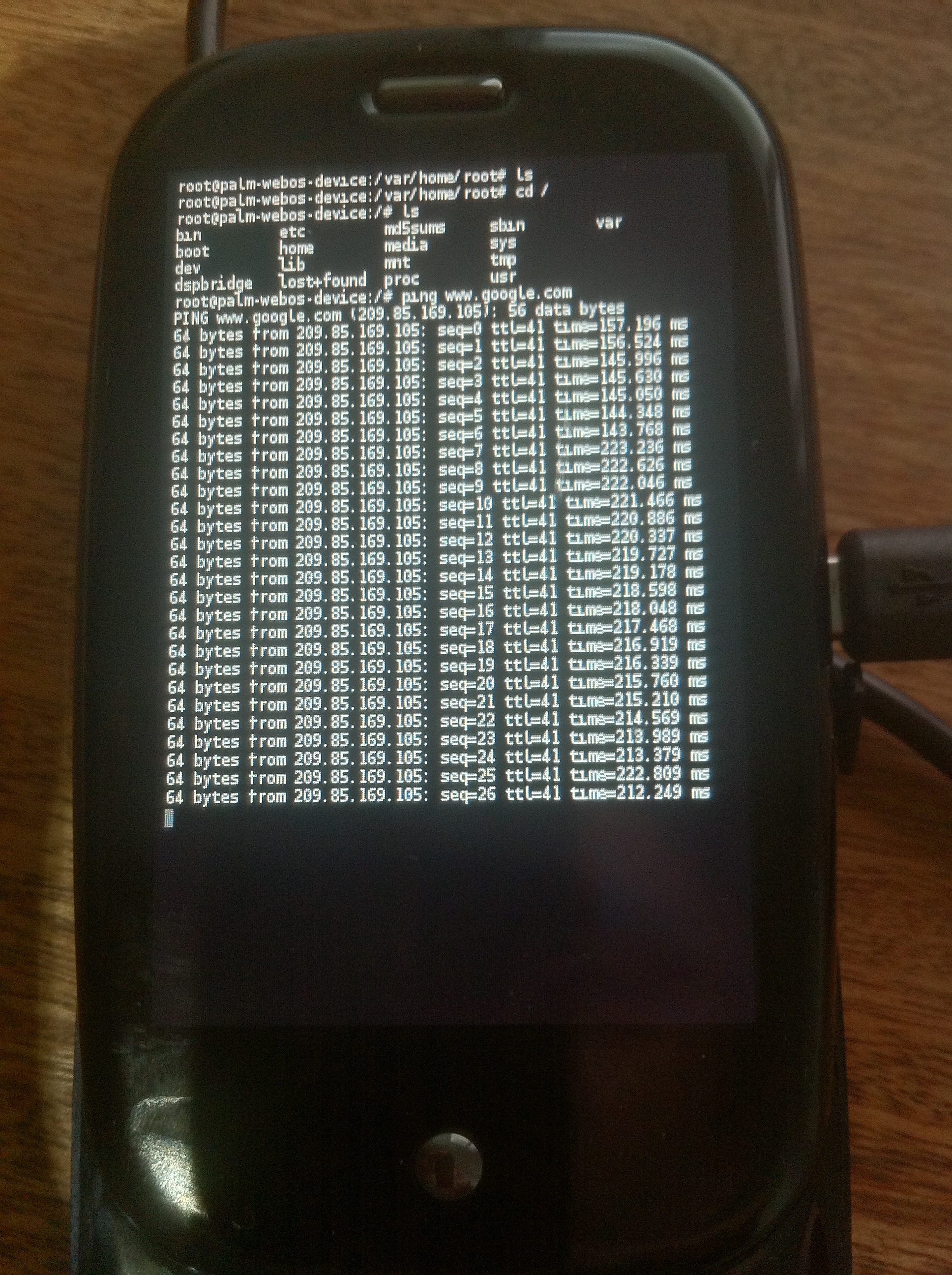
Yay root!

Notes

The Palm Pre uses BusyBox and glibc, yay:

From /lib/libc-2.5.so:

@GNU C Library stable release version 2.5, by Roland McGrath et al.
Copyright (C) 2006 Free Software Foundation, Inc.
This is free software; see the source for copying conditions.
There is NO warranty; not even for MERCHANTABILITY or FITNESS FOR A
PARTICULAR PURPOSE.
Compiled by GNU CC version 4.2.1.
Compiled on a Linux >>2.6.20-16-generic<< org="" software="" libc="" html="">.

and it has busybox complete file listing here: filelist

Output of df:

root@palm-webos-device:/# df -h
Filesystem                Size      Used Available Use% Mounted on
rootfs                  441.7M    413.4M     28.3M  94% /
/dev/root                31.0M     11.3M     19.7M  36% /boot
/dev/mapper/store-root
                        441.7M    413.4M     28.3M  94% /
/dev/mapper/store-root
                        441.7M    413.4M     28.3M  94% /dev/.static/dev
tmpfs                     2.0M    156.0k      1.8M   8% /dev
/dev/mapper/store-var
                        248.0M     22.7M    225.3M   9% /var
/dev/mapper/store-log
                         38.7M      6.0M     32.7M  16% /var/log
tmpfs                    64.0M      2.4M     61.6M   4% /tmp
tmpfs                    16.0M     44.0k     16.0M   0% /var/run
tmpfs                   119.5M         0    119.5M   0% /media/ram
/dev/mapper/store-media
                          6.7G     21.2M      6.7G   0% /media/internal
cryptofs                  6.7G     21.2M      6.7G   0% /media/cryptofs

Program for calculating E

A program for calculating E in C++, in a stupid way no doubt.

#include
#include

using namespace std;

int main() {

double sum=0;
for(double x=1;x<10;x=x+0.000000001) { double y = 1/x; sum += 0.000000001*y; if(sum >= 1) {
cout << "E: " << setprecision(15) << x << endl; return 0; } } } [/sourcecode] Another method: [sourcecode language="cpp"] #include
#include

using namespace std;

int main() {

double e=1;
for(double n=0;n<=1;n=n+0.000000001) { e=e+(e*0.000000001); } cout << "E: " << setprecision(15) << e << endl; } [/sourcecode]

Grabbing environment variables in gnuplot

set environment variables from bash e.g:

export positionsfile="$outputfile".positions
export rankprogressfile="$outputfile"

Then use them from gnuplot e.g.:

set size 1,1
set ylabel "Count"
set xlabel "Positions"

set terminal postscript eps color
set output "`echo $positionsfile`.eps"

plot "`echo $positionsfile`" using 1:2 with lines

Unobservable pin and password entry

This is a combination of two blog posts from Linuxjunk. The general idea to to create a pin and password entry system where even if you want watch the whole process and you know exactly what the user typed in, you still can’t unambiguously guess their password. I think it’s a pretty neat idea.

A one to many mapping is created between password symbols and the numbers you type in. That means the value you type in could come from any of a number of password characters. The mapping should be random so that the values you enter every time will be different. Given enough observations of course the attacker could identify the password, but it offers some security and could offer some advantage over challenge and response type systems.

I have two pieces of code, one from pin entry and one from alphabetic password entry.

Unobservable pin entry

The following is a command line, number mapping based version of the technique described at http://dapl.me/pinsecurity.html. It’s just a proof of concept, but I think Dans general idea is pretty neat. It could be a viable alternative to challenge and response type systems, and having this as a PAM module would be neat.

The following code is just a proof of concept. But it presents the user with two lists of numbers. The user PIN is hard coded as 1803 in this example. The first line shows the numbers 0 through 9. The second a random list of numbers.

The user enters numbers matching mapping from the first line to the second. Using this method it’s impossible for an observer to unambiguously guess the users pin.

Here’s an example run:

0,1,2,3,4,5,6,7,8,9,
2,4,3,3,0,2,4,3,3,4,
please enter pin: 4323
#include <iostream>
#include <vector>

using namespace std;

int main() {

 int valid_pw[5];
 valid_pw[0] = 1;
 valid_pw[1] = 8;
 valid_pw[2] = 0;
 valid_pw[3] = 3;

 int random_mapping[10];

 for(size_t n=0;n<10;n++) {
   random_mapping&#91;n&#93; = rand()%5;
 }

 for(size_t n=0;n<10;n++) {
   cout << n << ",";
 }
 cout << endl;

 for(size_t n=0;n<10;n++) {
   cout << random_mapping&#91;n&#93; << ",";
 }
 cout << endl;

 cout << "please enter pin: ";

 int get_pw&#91;4&#93;;

 // get pw...
 string input_line;
 getline(cin, input_line);

 for(size_t n=0;n<4;n++) {
   string singlechar;
   singlechar  += input_line&#91;n&#93;;
   get_pw&#91;n&#93; = atoi(singlechar.c_str());
 }

 // validate pw
 bool pass = true;
 for(size_t n=0;n<4;n++) {

   // find all locations with this mapping
   vector<int> valid_locs;
   for(size_t i=0;i<10;i++) {
     if(random_mapping&#91;i&#93; == get_pw&#91;n&#93;) valid_locs.push_back(i);
   }


   // if any match valid_pw&#91;n&#93; then the password is ok.
   bool thispass=false;
   for(size_t i=0;i<valid_locs.size();i++) {
     // cout << "valid: " << valid_locs&#91;i&#93; << endl;
     if(valid_locs&#91;i&#93; == valid_pw&#91;n&#93;) thispass=true;
   }
   if(thispass == false) pass = false;
 }
 cout << endl;

 if(pass) cout << "password valid"   << endl;
     else cout << "password invalid" << endl;
}
&#91;/sourcecode&#93;

<h2>Unobservable alphabetic password entry</h2>

This version allows you to use alphabetic passwords. It takes a command line argument which is the true password. When run it displays the following prompt:

[sourcecode language="bash"]
$ ./a.out test
| a | b | c | d | e | f | g | h | i | j | k | l | m | 
| 1 | 5 | 0 | 5 | 4 | 6 | 8 | 2 | 0 | 9 | 6 | 7 | 9 | 

| n | o | p | q | r | s | t | u | v | w | x | y | z | 
| 4 | 4 | 8 | 3 | 4 | 0 | 3 | 5 | 9 | 7 | 3 | 2 | 1 | 

please enter pin: 3403
password valid

#include
#include

using namespace std;

void display_mapping(size_t start,size_t end,vector random_mapping) {
cout << "| "; for(size_t n=start;n valid_pw;
string valid_pw_str = argv[1];

for(size_t n=0;n random_mapping(26,-1);

srand(time(NULL));
for(size_t n=0;n get_pw;

// get pw…
string input_line;
getline(cin, input_line);

for(size_t n=0;n valid_locs;
for(size_t i=0;i<26;i++) { if(random_mapping[i] == get_pw[n]) valid_locs.push_back('a' + i); } // if any match valid_pw[n] then the password is ok. bool thispass=false; for(size_t i=0;i