Archive for the ‘Uncategorized’ Category.

Green Clusters

This is a few years old now, the original article is here, but this seems to be becoming more relevant these days. I took it as read that they’d be no good for floating point calculations, but there are a lot of problems that only require integer arithmetic:

Green Clustering – N Whiteford

The question of power consumption at large data centres is of considerable interest. The most notable example of this is Google, where VP of operations Urs Holzle recently stated “power consumption is likely to become the most critical cost factor for data-centre budgets” [1]. Speculation on Googles future plans also indicate that rack density is a significant consideration [2].

A Standard IBM BladeCenter Chassis has 14 server bays and occupies 7Us of rack space (12in x 17.5in x 28in). Each bay may contain a dual processor 3.8GHz Intel blade [3] giving a total of 106.4GHz, or 15.2GHz per unit of rack space. This is representative of the highest rack density available at the present time.

Here we present a new clustering technology based around low powered embedded processors, which we believe will increase the overall GHz/Cm^2 and GHz/Watt.

Each node in such a cluster is a single embedded processor with associated storage and memory. A candidate node for such a cluster is the gumstix [4] Each device measures 80mm x 20mm x 6.3mm. Contains 16Mb of flash memory, 64Mb of ram and a 400MHz PXA255 ARM Processor. An onboard MMC slot is available on some models, and in the following scenario we shall assume this is populated with a 512Mb MMC Card. Each device consumes approximate 1W at peak utilisation [5].

The approximate dimensions of a 1U rack are: 43mm high x 444mm width x 711mm depth. If laid flat a single layer of gumstix in this area would contain 176 devices. Heat dissipation issues aside, such a rack should easily contain 4 such layers, or 704 devices, providing 281GHz of processing power. However, it is not clear that the heat produced from such a system could be dissipation effectively.

The IBM BladeCenter Chassis previously mentioned is rated to consume 2000W, being a 7U device this gives 285W per Unit of rack space. We shall therefore limit each gumstix rack unit to this power consumption. This allows each rack to contain 280 gumstix nodes, allowing an additional 5W for interconnect and routing requirements.

280 gumstix nodes would result in a total of 112GHz of processing power, 17.5Gb of RAM, 4.4Gb of onboard flash and 140Gb of MMC flash storage. It is however the processing power that is of the most interest, the various memory capacities could be increased without significant difficulty.

When comparing the 112GHz of PXA255 ARM Processing power with the 15.2GHz of 64Bit Intel processing power we must be careful not to make any rash judgements as we are far from comparing like with like. The PXA255 for example has no FPU and therefore performance of floating point operations will be absmally slow. I also do not have access to a 3.8GHz processor, we therefore have to jump though a number of hoops when estimating the relative processing capabilities of these devices.

We know the gumstix has a processing power approximately 5times the processing power of a Pentium 90MHz [6] for integer operations. We shall not consider floating point performance, as this will be understandably poor, and for many applications (such as string searching) unnecessary.

A Dell XPS Pentium 90MHz was previously rated at 2.88 in SPECint95 [7]. We can therefore estimate the gumstix SPECint95 rating as 14.44. SPECint95 was retired in the year 2000 so we can not compare this directly to the rating of a 3.8 Intel Xeon. However under SPECint95 a 1.0GHz Athlon rates as 42.9, A slightly faster processor (Athlon 1.2GHz) rated at 458 under CINT2000. This allows us to approximately convert a SPECint95 rating to CINT2000 by multiplying by a factor of ten. Under CINT2000, the 3.8GHz Intel Xeon IBM eServer (hyperthreading disabled) rated at 1820. Enabling hyperthreading may double this value. This gives us relative rating of 3640 for the 3.8GHz Xeon and 144 for the PXA255 used in the gumstix.

We previously showed that 1U of IBM BladeServer rack space provides 15.2GHz of processing power, using the above rating this equates to 14560 under CINT2000. 1U of gumstix processing would provide a rating of 40320. These very rough calculations show that a gumstix cluster could provide in excess 2 and a half times the computational power of the best existing servers in the same density and at the same power consumption. Further more, as it maybe easier to dissipate the heat of gumstix clusters than of traditional compute clusters (due to the larger surface area over which the heat is produced) it maybe possible to double or triple the rack density stated. It may also be possible to reduce the power requirements of the gumstix cluster by reducing the operating voltage (figures shown are based on an operating voltage of 4.5V but maybe reduced to 3.6V).
Trouble shooting malformed packets

Let’s say hypothetically you’re having an issue on your network, users are having trouble accessing files, browsing the web, everything really. You’re also experiencing significant ping loss.

Your best bet is to fire up a traffic sniffer. Back in the day, you’d have had to have paid 1000s for a decent traffic analysis tool. These days, Wireshark is probably a good a tool as you’ll ever need. On linux you also have tcpdump, which while not as capable, is sufficient for most applications, and has the advantage of running on the command line.

So, in our purely hypothetical scenario we might run tcpdump for a few seconds and see a bunch of packets like this:

$tcpdump 
tcpdump: verbose output suppressed, use -v or -vv for full protocol decode
listening on eth0, link-type EN10MB (Ethernet), capture size 65535 bytes
16:45:25.857702 ARP, Unknown (2048) 
	0x0000:  0001 0800 0604 0800 0604 0800 062b 0001  .............+..
	0x0010:  782b 0001 782b 0082 5add cb82 5add cb82  x+..x+..Z...Z...
	0x0020:  5a15 0a8c 7815 0a8c 7815 0a00 0000 0000  Z...x...x.......
	0x0030:  0000 0000 008c 0000 0a8c 0000 0a8c 008d  ................
	0x0040:  0000 828d 0000 828d 0000 0000 0000 0000  ................
	0x0050:  0000 0000 0000 0000 0000 0000 0000 0000  ................
	0x0060:  0000 0000 0000 0000 0000 0000 0000 0000  ................
...junk data with some stuff that kind of looks like text...
	0x0120:  0000 0000 0000 0000 0000 0000 0000 0000  ................
	0x0130:  0000 0000 0000 0000 0000 0000 0000 0000  ................
	0x0140:  0000 0000 0000 0000 0000 0000 0000 0000  ................
	0x0150:  0000 0000 0000 0000 0000 0000 0000 0000  ................
	0x0160:  0000 0000 0000 0000 0000 0000 00         .............
16:45:25.859144 14:30:00:30:14:30 (oui Unknown) Unknown SSAP 0x2a > 01:00:02:01:01:30 (oui Unknown) Unknown DSAP 0x14 Information, send seq 9, rcv seq 3, Flags [Response], length 365
16:45:25.859259 00:00:82:8d:00:00 (oui Unknown) > 00:8d:00:00:82:8d (oui Unknown) Null Information, send seq 0, rcv seq 0, Flags [Command], length 365
... some normal ssh data...
16:45:25.862577 0a:8c:00:00:0a:00 (oui Unknown) > 00:00:0a:8c:00:00 (oui Unknown), ethertype Unknown (0x828d), length 379: 
	0x0000:  0000 828d 0000 8200 0000 0000 0000 0000  ................
	0x0010:  0000 0000 0000 0000 0000 0000 0000 0000  ................
	0x0020:  0000 0000 0000 0000 0000 0000 0000 005e  ...............^
...junk data with some stuff that kind of looks like text...
	0x00e0:  0000 0000 0000 0000 0000 0000 0000 0000  ................
	0x00f0:  0000 0000 0000 0000 0000 0000 0000 0000  ................
	0x0100:  0000 0000 0000 0000 0000 0000 0000 0000  ................
	0x0110:  0000 0000 0000 0000 0000 0000 0000 0000  ................
	0x0120:  0000 0000 0000 0000 0000 0000 0000 0000  ................
	0x0130:  0000 0000 0000 0000 0000 0000 0000 0000  ................
	0x0140:  0000 0000 0000 0000 0000 0000 0000 0000  ................
	0x0150:  0000 0000 0000 0000 0000 0000 0000 0000  ................
	0x0160:  0000 0000 0000 0000 0000 0000 00         .............
16:45:25.862594 ARP, Unknown (2048) 
	0x0000:  0001 0800 0604 0800 0604 0800 062b 0001  .............+..
	0x0010:  782b 0001 782b 0082 5add cb82 5add cb82  x+..x+..Z...Z...
	0x0020:  5a15 0a8c 7815 0a8c 7815 0a00 0000 0000  Z...x...x.......
	0x0030:  0000 0000 008c 0000 0a8c 0000 0a8c 008d  ................
	0x0040:  0000 828d 0000 828d 0000 0000 0000 0000  ................
	0x0050:  0000 0000 0000 0000 0000 0000 0000 0000  ................
	0x0060:  0000 0000 0000 0000 0000 0000 0000 0000  ................
...junk data with some stuff that kind of looks like text...
	0x0120:  0000 0000 0000 0000 0000 0000 0000 0000  ................
	0x0130:  0000 0000 0000 0000 0000 0000 0000 0000  ................
	0x0140:  0000 0000 0000 0000 0000 0000 0000 0000  ................
	0x0150:  0000 0000 0000 0000 0000 0000 0000 0000  ................
	0x0160:  0000 0000 0000 0000 0000 0000 00         .............
16:45:25.862786 06:04:08:01:78:2b (oui Unknown) Unknown SSAP 0x2a > 08:00:06:04:08:00 (oui Unknown) Unknown DSAP 0x78 
^C^C^C^C
Information, send seq 0, rcv seq 0, Flags [Final], length 482
3511 packets captured
51751 packets received by filter
48210 packets dropped by kernel

Oh dear, there are two things wrong here. Firstly these don’t look like normal packets. MAC addresses contain a ID which is unique to each vendor, (oui Unknown) means that ID hasn’t been issued to a vendor, all the MAC addresses are also different! The packets themselves can’t be decoded by tcpdump, and seem to contain junk.

Secondly there are a lot of these packets, they’re flooding the network, but they’re not going to this host, and they’re not broadcast packets… Because they’re going to mac addresses that don’t exist the switches don’t know which port to send these packets to and they just floods the network in the hope of finding the right host. In a normal situation this would be find, the first packet to the host would locate the host, and all subsequent packets could go directly to it. In this case however , the host is a) never found because it doesn’t exist and b) is different almost every time.

So, something on the network is throwing out junk packets. Flooding the network with traffic. Not only that but it’s flooding the network with new mac addresses. To understand why this is a problem you need to know a little bit about network switching.

Time was, we all used network “hubs”. Hubs were dumb devices, they took the traffic from each port and forwarded it to all the others. This was fine for small networks, and great for hackers (who could sniff all the traffic on your network easily). However we got smarter, and started making things called switches. Network switches look at each packet coming from each port, when they see a new mac address they add it to a list of packets they’ve seen on that port. So inside your switch there’s a list that looks like this:

Port 1 - 58:55:aa:fb:cc:29
Port 2 - 58:55:ad:aa:ac:19
Port 3 - 58:55:ae:fe:e1:21
Port 4 - 58:55:ea:eb:ce:2a
Port 5 - 58:55:aa:ab:ca:4b
Port 6 - 58:55:aa:fb:ac:b9 58:55:4a:f2:a2:16 58:55:62:a2:1d:15 58:55:1c:1e:16:63 58:55:12:a3:31:cd 58:55:1d:c2:16:93

Ports 1 to 5 each have one host attached to them. That’s normal, you’d normally plug one computer into each port, so you’d only see traffic coming from one device. But what’s happening on port 6? That’s the port you’ve connected to another switch. This is an important rule when reading mac address tables. Each port should have one mac address, unless it’s an uplink port going to another switch.

Now, with something on your network producing hundreds of mac addresses your mac address tables are going to get pretty ugly. This is not good. Mac address tables can get full, and this can cause even more problems.

Anyway, lets recap. We know there’s something producing just packets, with junk mac addresses and throwing them out on the network. We now need to track this device down and burn it (ideally after hitting it very hard with a hammer). Those screwy mac address tables come to our rescue!

The exact procedure will be different for every switch, but pick a switch at random and login. Then view the mac address table. On Dell 7048s this is available from Switching->Address Tables->Dynamic Address Tables, select all rows. You should see one port which has all those weird broken MAC addresses assigned to it.

You now need to know a bit about your physical network. If that port is actually connected to a single host, then bingo you’ve found the host generating all the crap traffic. If it’s connected to another switch you need to repeat the procedure on that switch.

That’s it, congrats! You’ve found the device, now remove and toast lightly over an open fire.

In order to automate the process of finding which port a mac address is connected to I’ve written a bunch of Perl scripts for dell switches which you can find here. They come almost completely without instructions. But will pull mac address tables from your switches, and let you search for a particular mac address. I’ve scripted this to interrogate all switches at a site and dump their mac tables to a file. However be warned, if your network is behaving strangely it may be difficult to access your switches remotely.

My take on the Adapteva Parallella

If you don’t know what the Parallella is, go read their kickstarter page and come back.

The past

People have been talking about multicore for a long time. Every so often someone comes up with a novel architecture and they say that it’ll blow everything else out of the water Transputer, Connection Machine, SiCortex, XMOS, Tilera to name only a few.

They are really cool, really nice ideas, you should read about them. But they are expensive and end up being used in niche applications, mostly as expensive toys until commodity hardware completely overtakes them or they run out of money.

The reason people end up using desktop and mobile derived architectures is because they’re cheap and their price/performance and price/watt is often hard to match. Companies like Intel can afford to invest Billions in R&D, even if the architecture is clunky and ill suited to many applications, it still comes out ahead.

The present

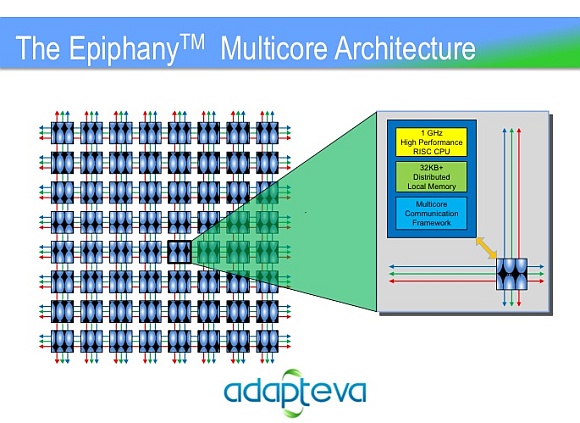
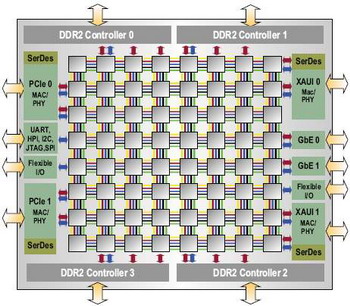
A while ago I took a look at the Tilera platform, Tilera make a chip that looks a lot like the Epiphany-IV (this is the device they’ll make if they reach their 3million USD stretch goal), it’s called the TILEPro64, and is available today. The architecture of the Epiphany-IV and the TILEPro64 looks VERY similar (see the architecture diagrams below). I’d be surprised if there weren’t some patent fights over this in the future if either platform gets that far. They’re both mesh networked CPUs with limited on core memory, and you have to carefully optimise your code to keep the cores fed with data.

In Tilera’s case I was unconvinced. I think they have a product that probably shows at most a 2 to 5x performance benefit over Intel at the same Wattage (for some applications) and costs more than 10 times as much. Development kits are also likely to be HUGELY expensive.

In Tilera’s case my call was that if the unit cost was the same as Intel, and they showed a 10x performance benefit, they might have a chance. Even in this case I think it would be a hard slog to gain traction in the market, and it would be a constant fight as Intel and ARM licensees bring out new CPUs. So in Tilera’s case I felt they might find there way in to some high end routers, and will be used in a few HPC applications but eventually they’ll get left behind by commodity CPUs and disappear.

The future

So can Adapteva pull it off, when a bunch of people have tried and failed in the past? I’m still pretty skeptical. I’d say you need to be 10 times faster than Intel (at the same cost or wattage) for people to take you seriously.

The Epiphany-IV has several advantages over Tilera, the first is price. If you can really get the Epiphany-IV for 99 dollars in volume that’s pretty amazing. The second is that the Epiphany has hardware floating point, for many applications that’s an advantage too. The third is power, Adapteva talk about a 2 watt power consumption whereas the numbers I’ve heard for Tilera are more like 20 watts.

With lower power consumption than the Tilera, it’s just about possible that they might hit the sweet spot and be 10times faster than Intel per watt. So I’m slightly more optimistic than I was about Tilera.

However their current product, the Epiphany-III doesn’t look anything like as good. I don’t think that device will buy you very much over using commodity CPUs, it will however be an interesting toy and prime you for the release of the Epiphany IV.

I wish them the best of luck, I think the Kickstarter project could give them some momentum. I’d love to see a affordable massively multicore CPU on the market. At the end of they day though, I still think our best bet will be Intel and ARM slowly iterating in this direction.

SFlow configuration and usage on Dell 7048 (and other) switches

Via the web interface:


Navigate to: System->sFlow

Select "Receiver Configuration"

Set:
Receiver Owner: 1
Receiver IP : IP of server
Tick "No timeout"
Click Apply

Select "Sampler configuration"

Set Sampler Datasource (anything)
Receiver Index as "Receiver Owner" above, e.g. 1
Sampler rate: 1024
Click Apply

On a Linux server, receiving the SFlow packets. Get sflowtool-3.25, untag it/build.

Create a tcpdump format capture of incoming data:

./sflowtool -t >  a.cap

View it in tcpdump:

tcpdump -r a.cap