Arduino SNMP Voltage Monitor
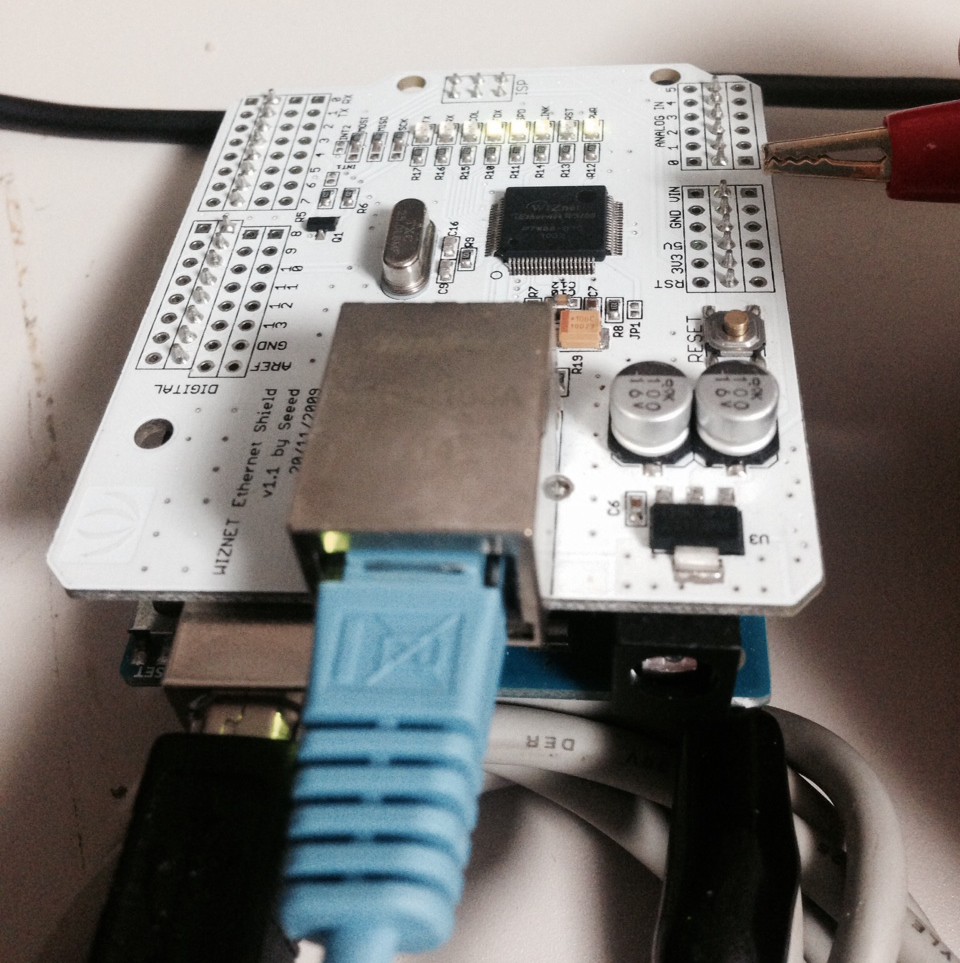
As a quick proof of concept I wanted to try using the Arduino with a Wiznet TCP/IP Ethernet chip as a SNMP server to monitor an analog input. The eventual use-case being a battery monitor. Turns out there’s already an SNMP library for the Arduino called Agentuino. It hasn’t been updated in a couple of years, but seems to work well. I installed the library and modified the code to catch the OID associated with UPS battery charge level (1.3.6.1.4.1.318.1.1.1.2.2.1.0). I then just return the value of input A0. This can then be read using snmpget (available in the snmp package on Debian):
root@navlaptop:/home/new# snmpget -v 1 -r 1 -c public 192.168.2.64 1.3.6.1.4.1.318.1.1.1.2.2.1.0 # NC
iso.3.6.1.4.1.318.1.1.1.2.2.1.0 = INTEGER: 78
root@navlaptop:/home/new# snmpget -v 1 -r 1 -c public 192.168.2.64 1.3.6.1.4.1.318.1.1.1.2.2.1.0 # ~ 2.5V
iso.3.6.1.4.1.318.1.1.1.2.2.1.0 = INTEGER: 444
root@navlaptop:/home/new# snmpget -v 1 -r 1 -c public 192.168.2.64 1.3.6.1.4.1.318.1.1.1.2.2.1.0 #NC
iso.3.6.1.4.1.318.1.1.1.2.2.1.0 = INTEGER: 88
So the setup appears to work quite well. One concern is the power concumption which with the Arduino and Wiznet is around 170mA. This might not be suitable for the solar deployment I’ve been looking at.
Anyway the code is below (it’s just a modified version of the Agentuino sample):
/**
* Agentuino SNMP Agent Library Prototyping...
*
* Copyright 2010 Eric C. Gionet <[email protected]>
*
*/
#include <Streaming.h>         // Include the Streaming library
#include <Ethernet.h>          // Include the Ethernet library
#include <SPI.h>
#include <MemoryFree.h>
#include <Agentuino.h>
#include <Flash.h>
//
#define DEBUG
//
static byte mac[] = { 0xDE, 0xAD, 0xBE, 0xEF, 0xFE, 0xED };
static byte ip[] = { 192, 168, 2, 64 };
static byte gateway[] = { 192, 168, 2, 1 };
static byte subnet[] = { 255, 255, 255, 0 };
//
// tkmib - linux mib browser
//
// RFC1213-MIB OIDs
// .iso (.1)
// .iso.org (.1.3)
// .iso.org.dod (.1.3.6)
// .iso.org.dod.internet (.1.3.6.1)
// .iso.org.dod.internet.mgmt (.1.3.6.1.2)
// .iso.org.dod.internet.mgmt.mib-2 (.1.3.6.1.2.1)
// .iso.org.dod.internet.mgmt.mib-2.system (.1.3.6.1.2.1.1)
// .iso.org.dod.internet.mgmt.mib-2.system.sysDescr (.1.3.6.1.2.1.1.1)
const static char sysDescr[] PROGMEM      = "1.3.6.1.2.1.1.1.0";  // read-only  (DisplayString)
// .iso.org.dod.internet.mgmt.mib-2.system.sysObjectID (.1.3.6.1.2.1.1.2)
const static char sysObjectID[] PROGMEM   = "1.3.6.1.2.1.1.2.0";  // read-only  (ObjectIdentifier)
// .iso.org.dod.internet.mgmt.mib-2.system.sysUpTime (.1.3.6.1.2.1.1.3)
const static char sysUpTime[] PROGMEM     = "1.3.6.1.2.1.1.3.0";  // read-only  (TimeTicks)
// .iso.org.dod.internet.mgmt.mib-2.system.sysContact (.1.3.6.1.2.1.1.4)
const static char sysContact[] PROGMEM    = "1.3.6.1.2.1.1.4.0";  // read-write (DisplayString)
// .iso.org.dod.internet.mgmt.mib-2.system.sysName (.1.3.6.1.2.1.1.5)
const static char sysName[] PROGMEM       = "1.3.6.1.2.1.1.5.0";  // read-write (DisplayString)
// .iso.org.dod.internet.mgmt.mib-2.system.sysLocation (.1.3.6.1.2.1.1.6)
const static char sysLocation[] PROGMEM   = "1.3.6.1.2.1.1.6.0";  // read-write (DisplayString)
// .iso.org.dod.internet.mgmt.mib-2.system.sysServices (.1.3.6.1.2.1.1.7)
const static char sysServices[] PROGMEM   = "1.3.6.1.2.1.1.7.0";  // read-only  (Integer)

// .1.3.6.1.4.1.318.1.1.1.2.2.1.0
const static char upsBatPnct[] PROGMEM = "1.3.6.1.4.1.318.1.1.1.2.2.1.0";

//
// Arduino defined OIDs
// .iso.org.dod.internet.private (.1.3.6.1.4)
// .iso.org.dod.internet.private.enterprises (.1.3.6.1.4.1)
// .iso.org.dod.internet.private.enterprises.arduino (.1.3.6.1.4.1.36582)
//
//
// RFC1213 local values
static char locDescr[]              = "Agentuino, a light-weight SNMP Agent.";  // read-only (static)
static char locObjectID[]           = "1.3.6.1.3.2009.0";                       // read-only (static)
static uint32_t locUpTime           = 0;                                        // read-only (static)
static char locContact[20]          = "Eric Gionet";                            // should be stored/read from EEPROM - read/write (not done for simplicity)
static char locName[20]             = "Agentuino";                              // should be stored/read from EEPROM - read/write (not done for simplicity)
static char locLocation[20]         = "Nova Scotia, CA";                        // should be stored/read from EEPROM - read/write (not done for simplicity)
static int32_t locServices          = 7;                                        // read-only (static)

uint32_t prevMillis = millis();
char oid[SNMP_MAX_OID_LEN];
SNMP_API_STAT_CODES api_status;
SNMP_ERR_CODES status;

void pduReceived()
{
  SNMP_PDU pdu;
  //
  #ifdef DEBUG
    Serial << F("UDP Packet Received Start..") << F(" RAM:") << freeMemory() << endl;
  #endif
  //
  api_status = Agentuino.requestPdu(&pdu);
  //
  if ( pdu.type == SNMP_PDU_GET || pdu.type == SNMP_PDU_GET_NEXT || pdu.type == SNMP_PDU_SET
    && pdu.error == SNMP_ERR_NO_ERROR && api_status == SNMP_API_STAT_SUCCESS ) {
    //
    pdu.OID.toString(oid);
    //
    //Serial << "OID: " << oid << endl;
    //
    if ( strcmp_P(oid, sysDescr ) == 0 ) {
      // handle sysDescr (set/get) requests
      if ( pdu.type == SNMP_PDU_SET ) {
        // response packet from set-request - object is read-only
        pdu.type = SNMP_PDU_RESPONSE;
        pdu.error = SNMP_ERR_READ_ONLY;
      } else {
        // response packet from get-request - locDescr
        status = pdu.VALUE.encode(SNMP_SYNTAX_OCTETS, locDescr);
        pdu.type = SNMP_PDU_RESPONSE;
        pdu.error = status;
      }
      //
      #ifdef DEBUG
        Serial << F("sysDescr...") << locDescr << F(" ") << pdu.VALUE.size << endl;
      #endif
    } else if ( strcmp_P(oid, sysUpTime ) == 0 ) {
      // handle sysName (set/get) requests
      if ( pdu.type == SNMP_PDU_SET ) {
        // response packet from set-request - object is read-only
        pdu.type = SNMP_PDU_RESPONSE;
        pdu.error = SNMP_ERR_READ_ONLY;
      } else {
        // response packet from get-request - locUpTime
        status = pdu.VALUE.encode(SNMP_SYNTAX_TIME_TICKS, locUpTime);
        pdu.type = SNMP_PDU_RESPONSE;
        pdu.error = status;
      }
      //
      #ifdef DEBUG
        Serial << F("sysUpTime...") << locUpTime << F(" ") << pdu.VALUE.size << endl;
      #endif
    } else if ( strcmp_P(oid, sysName ) == 0 ) {
      // handle sysName (set/get) requests
      if ( pdu.type == SNMP_PDU_SET ) {
        // response packet from set-request - object is read/write
        status = pdu.VALUE.decode(locName, strlen(locName));
        pdu.type = SNMP_PDU_RESPONSE;
        pdu.error = status;
      } else {
        // response packet from get-request - locName
        status = pdu.VALUE.encode(SNMP_SYNTAX_OCTETS, locName);
        pdu.type = SNMP_PDU_RESPONSE;
        pdu.error = status;
      }
      //
      #ifdef DEBUG
        Serial << F("sysName...") << locName << F(" ") << pdu.VALUE.size << endl;
      #endif
    } else if ( strcmp_P(oid, sysContact ) == 0 ) {
      // handle sysContact (set/get) requests
      if ( pdu.type == SNMP_PDU_SET ) {
        // response packet from set-request - object is read/write
        status = pdu.VALUE.decode(locContact, strlen(locContact));
        pdu.type = SNMP_PDU_RESPONSE;
        pdu.error = status;
      } else {
        // response packet from get-request - locContact
        status = pdu.VALUE.encode(SNMP_SYNTAX_OCTETS, locContact);
        pdu.type = SNMP_PDU_RESPONSE;
        pdu.error = status;
      }
      //
      #ifdef DEBUG
        Serial << F("sysContact...") << locContact << F(" ") << pdu.VALUE.size << endl;
      #endif
    } else if ( strcmp_P(oid, sysLocation ) == 0 ) {
      // handle sysLocation (set/get) requests
      if ( pdu.type == SNMP_PDU_SET ) {
        // response packet from set-request - object is read/write
        status = pdu.VALUE.decode(locLocation, strlen(locLocation));
        pdu.type = SNMP_PDU_RESPONSE;
        pdu.error = status;
      } else {
        // response packet from get-request - locLocation
        status = pdu.VALUE.encode(SNMP_SYNTAX_OCTETS, locLocation);
        pdu.type = SNMP_PDU_RESPONSE;
        pdu.error = status;
      }
      //
      #ifdef DEBUG
        Serial << F("sysLocation...") << locLocation << F(" ") << pdu.VALUE.size << endl;
      #endif
    } else if ( strcmp_P(oid, sysServices) == 0 ) {
      // handle sysServices (set/get) requests
      if ( pdu.type == SNMP_PDU_SET ) {
        // response packet from set-request - object is read-only
        pdu.type = SNMP_PDU_RESPONSE;
        pdu.error = SNMP_ERR_READ_ONLY;
      } else {
        // response packet from get-request - locServices
        status = pdu.VALUE.encode(SNMP_SYNTAX_INT, locServices);
        pdu.type = SNMP_PDU_RESPONSE;
        pdu.error = status;
      }
      //
      #ifdef DEBUG
        Serial << F("locServices...") << locServices << F(" ") << pdu.VALUE.size << endl;
      #endif
    } else if ( strcmp_P(oid, upsBatPnct) == 0) {

      // battery voltage output
      int val = analogRead(0);
      status = pdu.VALUE.encode(SNMP_SYNTAX_INT, val);
      pdu.type = SNMP_PDU_RESPONSE;
      pdu.error = status;
    }

    else {
      // oid does not exist
      //
      // response packet - object not found
      pdu.type = SNMP_PDU_RESPONSE;
      pdu.error = SNMP_ERR_NO_SUCH_NAME;
    }
    //
    Agentuino.responsePdu(&pdu);
  }
  //
  Agentuino.freePdu(&pdu);
  //
  //Serial << "UDP Packet Received End.." << " RAM:" << freeMemory() << endl;
}

void setup()
{
  Serial.begin(9600);
  Ethernet.begin(mac, ip);
  //
  api_status = Agentuino.begin();
  //
  if ( api_status == SNMP_API_STAT_SUCCESS ) {
    //
    Agentuino.onPduReceive(pduReceived);
    //
    delay(10);
    //
    Serial << F("SNMP Agent Initalized...") << endl;
    //
    return;
  }
  //
  delay(10);
  //
  Serial << F("SNMP Agent Initalization Problem...") << status << endl;
}

void loop()
{
  // listen/handle for incoming SNMP requests
  Agentuino.listen();
  //
  // sysUpTime - The time (in hundredths of a second) since
  // the network management portion of the system was last
  // re-initialized.
  if ( millis() - prevMillis > 1000 ) {
    // increment previous milliseconds
    prevMillis += 1000;
    //
    // increment up-time counter
    locUpTime += 100;
  }
}
Arduino SNMP:
https://code.google.com/p/agentuino/
Arduino SNMP Temp:
http://openhardware.gridshield.net/home/arduino-snmp-temperature-sensor





 RSS
RSS